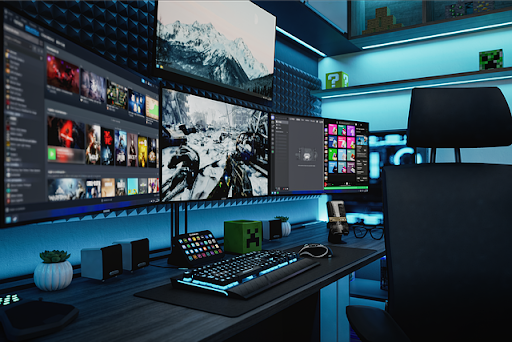
There are unique challenges in creating a high-performance gaming space within the constraints of an HDB flat. Transforming your living area into an immersive gaming command center demands careful planning, adherence to strict building regulations, and precise execution. This comprehensive guide provides the factual, heavily researched information you need to successfully mount your gaming equipment, from a robust wall mount PC case like the Thermaltake Core P5 to intricate cable management systems, while fully complying with HDB’s renovation framework.
The appeal of a wall-mounted setup is clear: it saves precious floor space, showcases your hardware, improves airflow, and creates a clean, focused gaming environment. However, the process involves navigating specific HDB rules on drilling, understanding your wall’s load-bearing capacity, and selecting the correct mounts for every component, from a Samsung computer monitor wall mount to a specialized Xbox One wall mount.
Understanding HDB Regulations for Drilling and Mounting
Before you pick up a drill, understanding the rules set by the Housing & Development Board (HDB) is your first and most critical step. Non-compliance can lead to structural damage, fines, and the costly reinstatement of your flat.
The cornerstone of HDB’s drilling policy is clear: all fasteners—screws, nails, or bolts—must not exceed 6mm in diameter and 40mm in penetration depth for all types of flats. This rule is designed to prevent damage to concealed electrical wiring and plumbing. For newer flats with Ferrolite Partition Walls, extra precautions apply. Drilling must avoid a 200mm strip below ceilings and beams and a central strip on the wall to miss steel connectors. Furthermore, penetration into these walls should be limited to about 22mm, and each bolt should not support more than 50kg.
The guidelines also stipulate that noisy work, including drilling, is restricted to weekdays between 9:00 am and 5:00 pm and is prohibited on Saturdays, Sundays, and Public Holidays. For any electrical work associated with your setup, such as installing new power points for your Asus AC5300 wall mount router or dual technology occupancy sensor wall mounted for smart lighting, you must engage an Energy Market Authority (EMA) licensed electrical worker.
Planning Your Wall-Mounted Gaming Setup
A successful installation begins on paper. Start by assessing your chosen wall. Use a professional stud finder to locate the vertical timber or metal studs behind the plaster; these provide the necessary strength to hold weight safely. Mounting directly into plaster without hitting a stud requires specialized hollow-wall anchors, but for heavy items like a wall mount PC shelf holding a full tower, anchoring into studs is non-negotiable.
Next, create a detailed plan. Map out the positions of all components: your wall mount monitor arm Singapore setup, the wall mount pc case, consoles, and peripherals. This is the stage to decide between a fixed wall mount monitor bracket or a more flexible wall mount monitor swing arm. Consider ergonomics, as well. The center of your primary screen, whether on an Acer Predator X34 wall mount or an Acer Predator xb271hu wall mount, should be at or slightly below eye level when seated. Ensure all mounting points align with the studs you’ve located.
Finally, gather all necessary equipment. This includes the specific mounting kits for your gear (like a dedicated Xbox One S wall mount), a high-quality drill, the correct drill bits, a spirit level, measuring tape, and cable management supplies such as a wall mount fiber optic patch panel for network cables and adhesive raceways or sleeving for power cords.
Step-by-Step Installation Guide
Follow this enumerated guide to ensure a secure and level installation.
| Step | Details |
|---|---|
| Step 1: Mark and Measure with Precision | Use your planning diagram and a pencil to mark the exact drilling points on the wall. Double-check measurements, especially for multiple monitor arms like a wall mount monitor arm with keyboard tray. Use a spirit level across all marks to ensure perfect alignment. |
| Step 2: Drill Pilot Holes | Select a drill bit slightly smaller than the diameter of your wall plugs or mounting screws. Drill straight into the wall at your marked points, strictly controlling depth to comply with the 40mm HDB limit. For Ferrolite walls, be especially cautious not to exceed 22mm. |
| Step 3: Install Wall Anchors | Insert the appropriate plastic or metal wall anchors into the pilot holes. For heavy loads mounted on studs, you may use heavy-duty wood screws directly without anchors. Tap them in gently until flush with the wall. |
| Step 4: Secure the Mounting Brackets | Align your mounting bracket—be it for an Acer Predator Z35P wall mount or a Gamecube controller wall mount display—over the anchors. Use the provided screws and a screwdriver or drill to firmly secure the bracket to the wall. Avoid over-tightening, which can strip the anchor. |
| Step 5: Attach the Equipment | Following the manufacturer’s instructions, attach the mounting plates or arms to your gear. For a Thermaltake Core P5 wall mount setup, this typically involves securing a bracket to the case’s chassis. Then, carefully lift and hang the equipment onto the wall-mounted bracket. |
| Step 6: Cable Management | This final step creates a clean, professional look. Route all power, video, and data cables neatly along the mount arms or using separate clips and raceways. Consolidate network cables into a wall mount fiber optic patch panel. Use zip ties or velcro straps to bundle cables together, leaving no loose wires dangling. |
Installing monitors, gaming rigs, or display mounts in your HDB flat? FixFirst’s certified handymen provide safe, precise installation that respects HDB drilling limits and ensures long-term stability. From Acer Predator monitors to custom PC cases and accessory displays, we handle complex setups with care, alignment, and expert cable management—so your space looks sleek, organized, and ready for action.

Key Considerations for Specific Gaming Components
Different gear presents unique mounting challenges. A DIY Xbox one wall mount project might involve a custom shelf, while a monitor requires specific VESA pattern compatibility. Ensure your Acer Predator X34p wall mount or Acer Predator XB272 wall mount is rated for the monitor’s exact weight and size. For PC cases, verify that the wall mount PC case bracket is compatible with your chassis model and provides adequate ventilation.
Peripherals and network hardware also matter. An Xbox controller wall mount keeps your controllers accessible and tidy. Mounting a powerful router like the Asus AC5300 wall mount can improve Wi-Fi coverage but requires access to power and your home’s internet cable. Integrating smart home tech, like a dual technology occupancy sensor wall mounted, can automate your room’s lighting, adding convenience and efficiency to your gaming space.
Summary of Key Mounting Guidelines
The table below consolidates the essential rules and best practices for a safe and successful installation.
| Aspect | HDB Rule / Best Practice | Importance & Rationale |
|---|---|---|
| Drilling Specifications | Max 6mm diameter, 40mm depth for all flats. | Prevents damage to concealed electrical wires, plumbing, and internal wall structures. |
| Ferrolite Wall Drilling | Avoid 200mm strips at top/center; max 22mm penetration. | Prevents damage to steel connecting plates and the sound insulation core within these walls. |
| Load Limits (Ferrolite) | Max 50kg per bolt, with appropriate anchors. | Ensures the partition wall is not overloaded, which could cause fixture failure or wall damage. |
| Noisy Work Hours | Drilling allowed on weekdays, 9:00 am to 5:00 pm only. | Minimizes disturbance to neighbors, in line with community living guidelines. |
| Electrical Work | Must be performed by an EMA-licensed electrical worker. | Guarantees safety, compliance with national standards, and avoids fire or electrical hazards. |
| Professional Help | Engage HDB-registered contractors for complex work. | Ensures work is performed to standard, with proper insurance and adherence to all regulations. |

Frequently Asked Questions (FAQs)
No, minor works like mounting TVs, monitors, shelves, and consoles typically do not require a renovation permit, provided you follow the drilling guidelines (6mm/40mm) and do not hack into structural walls. However, if the work involves new electrical points, that licensed electrical work must follow separate EMA rules.
For typical plastered brick walls, a properly installed anchor in a solid section can hold significant weight (20-50kg for a good anchor). For Ferrolite Partition Walls, HDB specifies a maximum of 50kg per bolt. Always distribute weight across multiple studs for heavy items like a full wall mount pc shelf.
Use an electronic stud finder, available at hardware stores. For greater accuracy, especially to avoid wires and pipes, you can use a combination of a stud finder and careful exploratory drilling with a very small bit after checking HDB’s electrical wiring sketch for your flat type.
Yes, but with strict precautions. You must use the correct anchors for the load, avoid the prohibited drilling strips near the top and middle of the wall, limit drilling depth to ~22mm, and never exceed the 50kg per bolt limit.
Yes, using a high-quality, weight-rated VESA mount is safe. Ensure the mount is certified for both the weight and VESA pattern (e.g., 100x100mm or 75x75mm) of your specific model, whether it’s an Acer Predator xb281hk wall mount or an Acer Predator z321qu wall mount. The critical factor is securely anchoring the mount into wall studs.
Plan your cable routes before mounting. Use adhesive-backed cable raceways or sleeves along the wall. For multiple devices, a wall mount monitor arm with keyboard tray often has built-in cable channels. For complex setups with networking gear, a wall mount fiber optic patch panel organizes cables professionally.
You should engage an HDB-registered renovation contractor or a reliable handyman service like FixFirst. For any part of the job involving electrical work—such as installing new outlets for your Asus AC5300 wall mount router or a dual technology occupancy sensor wall mounted—you must hire an EMA-licensed electrical worker.
Creating a wall-mounted gaming sanctuary in your Singapore HDB is a rewarding project that elevates your gaming experience and maximizes your living space. Success hinges on respecting the structural guidelines of your home, choosing the right hardware for each component—from a secure wall mount monitor bracket to a showcase-ready Thermaltake Core P5 wall mount—and executing the installation with precision and care. While a DIY approach is possible for simpler tasks, the complexity of aligning heavy equipment, managing cables, and ensuring absolute safety often calls for professional expertise.
Contact FixFirst today for an installation. Our skilled handymen specialize in safe, precise mounting solutions for all your gaming gear, ensuring your setup is not only impressive but also built to last within your HDB home.