For professionals, heavy gamers, and creative individuals across Singapore, the home office has become a central hub of productivity and focus. In the compact living spaces of HDB flats and condominiums, managing two or more computer monitors presents a unique challenge. Desks become cluttered, precious workspace disappears, and finding an ergonomic viewing position for two screens can feel impossible. This is where a dual monitor wall mount becomes a transformative solution. It is a strategic tool for reclaiming your desk, organizing your cables, and building a workstation that supports your well-being and efficiency. However, installing one in your HDB home requires careful planning around building regulations, selecting the right mount, and executing a precise installation. This comprehensive guide will walk you through every step of choosing and installing the best dual monitor wall mount for your Singapore home.

Understanding the Dual Monitor Wall Mount and Its Key Benefits
A dual computer monitor wall mount is a sophisticated mounting system that attaches two monitors to a single bracket fixed to your wall. It replaces the bulky stands that come with your monitors, lifting them off the desk and allowing you to position them with a high degree of control. The core benefit in a Singaporean context is profound space liberation. By clearing monitors off your desk, you instantly create a cleaner, more expansive work surface, a precious commodity in our homes. This shift unlocks superior ergonomics. You can adjust the height, tilt, and swivel of each monitor independently to achieve the perfect alignment with your seated eye level, dramatically reducing neck and back strain during long work sessions.
Many discussions on forums like dual monitor wall mount Reddit communities highlight the “Aha!” moment users experience when they first achieve that perfect, floating screen setup. Furthermore, these mounts introduce incredible flexibility. Whether you need a side-by-side configuration for data analysis, a primary screen with a vertical secondary screen for coding, or the ability to push both monitors flat against the wall when not in use, a wall mount dual monitor arm provides that adaptability. This level of customization transforms a static desk into a dynamic command center tailored to your specific tasks.
Navigating HDB Regulations for Safe Wall Mounting
Before you purchase a single bracket or pick up a drill, understanding the Housing & Development Board’s (HDB) renovation guidelines is an essential and non-negotiable first step. These rules exist to protect the structural integrity of your building and ensure the safety of all residents. According to official HDB documents, homeowners bear full responsibility for all renovation works within their unit.
While installing a dual monitor wall mount typically does not require a formal renovation permit, the activity of drilling into walls is strictly governed. A critical rule prohibits “drilling of holes through beams, columns, and other structural members.” Accidentally drilling into a reinforced concrete beam can compromise safety. For modern HDB flats with Ferrolite Partition Walls, even stricter limits apply: fasteners must not exceed 6mm in diameter and 40mm in penetration depth, and the load per bolt is limited. These constraints make professional assessment vital, as the combined weight of two monitors, especially larger ones, must be safely distributed. HDB also enforces specific “permitted hours” for noisy work like drilling, generally restricting it to weekdays between 9:00 am and 5:00 pm. Engaging a professional service that understands these rules ensures your project is fully compliant and safe.
Choosing the Correct Dual Monitor Wall Mount
Selecting the right mount is the most important technical decision you will make. Your choice must match your monitors’ specifications, your desired flexibility, and your wall’s construction. The process begins with two key specifications for each monitor: its VESA pattern (the distance between the four mounting holes on the back) and its weight. You must add the weight of both monitors and ensure the mount’s load capacity exceeds this total. The type of mount determines your range of motion.
Fixed or Low-Profile Mounts hold both monitors in a fixed, side-by-side position close to the wall. This option provides the cleanest, most streamlined look and is ideal for a permanent setup where you do not need to adjust the screens frequently. It offers maximum stability for a minimalist workspace.
Articulating or Full-Motion Mounts feature arms with multiple joints, allowing you to adjust each monitor’s height, tilt, swivel, and even pull them away from the wall. This offers the ultimate in ergonomic customization, letting you position each screen perfectly throughout your workday. A high-quality wall mount dual monitor arm from brands like Ergotron or Vivo provides smooth, gas-spring-assisted movement.
Monitor Arms with Desk Clamps vs. Wall Mounts present another choice. While desk-clamp arms are popular, they consume valuable desk space and may not be stable on all desks. A true dual monitor wall mount is often the superior choice for Singapore homes as it completely frees the desk surface and provides a more permanent, integrated installation anchored directly into the wall studs for unwavering stability.


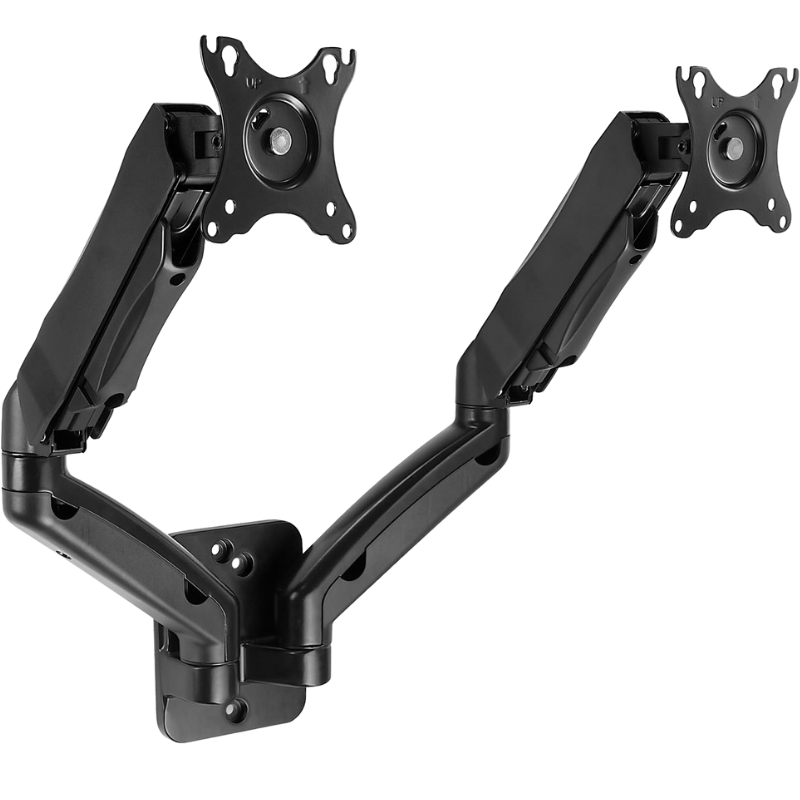
A Professional’s Guide to Mounting Your Dual Monitor Wall Mount
A proper dual monitor wall mount installation is a meticulous process that prioritizes safety and precision. Following a systematic, step-by-step approach is key to success. Here is the professional method our technicians use:
| Step | Details |
|---|---|
| Step 1: Plan the Location and Locate Studs | Determine the optimal viewing height. The top of the monitors should be at or slightly below your seated eye level. Use a high-quality electronic stud finder to locate the solid wooden or metal studs in your wall. Mark their exact edges. The main mounting plate of your bracket must be anchored directly into at least two studs for safe support. Never mount by anchoring only into plaster or drywall. |
| Step 2: Prepare the Monitors and Mounting Arms | Disconnect and lay each monitor face-down on a soft, protected surface. Attach the VESA mounting plates to the back of each monitor using the screws provided with the mount or your monitors. Ensure they are secure. |
| Step 3: Install the Main Wall Plate | Hold the central wall plate of the dual computer monitor wall mount against the wall, ensuring it aligns with the centre of the studs you marked. Use a spirit or laser level to ensure it is perfectly horizontal. Mark the drilling points, drill pilot holes into the centre of the studs, and secure the plate firmly using the provided heavy-duty lag screws. |
| Step 4: Assemble and Attach the Arms | Following the manufacturer’s instructions, assemble the mounting arms. For articulating arms, you may need to attach the monitor plates to the arms first. Then, carefully lift and connect the arm assembly to the secured wall plate. Tighten all pivot points to your desired resistance. |
| Step 5: Hang the Monitors and Manage Cables | With assistance if needed, hang each monitor onto its respective arm. Engage any safety locks. Adjust the monitors to your preferred position. Finally, route all power, HDMI, and other cables along the mounting arms using the integrated cable channels or adhesive clips. Use a cable sleeve or raceway to guide the bundled cables neatly down the wall to your desktop, achieving a clean, professional look. |
Need help mounting your dual computer monitors? FixFirst’s certified handymen provide safe, professional installation across all HDB flat types. We handle everything from stud detection and VESA compatibility to ergonomic positioning and cable management. Whether it’s for a home office, workstation, or gaming setup, we ensure your monitors are secure, comfortable, and clutter-free—right the first time.
Why Choose a FixFirst Handyman for Your Dual Monitor Wall Mount Installation
Installing a dual monitor wall mount involves technical challenges that go beyond simple DIY. Entrusting the job to FixFirst professionals delivers a flawless result and complete peace of mind.
✔️ Expert Knowledge of HDB Construction & Regulations: Our technicians are trained in HDB building standards. We identify safe mounting locations, avoid structural beams and concealed wiring, select the correct anchors for your wall type (concrete, brick, or Ferrolite partition), and ensure all work complies with permitted hours.
✔️ Precision Installation for Perfect Alignment: We arrive equipped with professional tools like laser levels and stud finders. We guarantee your dual monitor wall mount is installed perfectly level and anchored with the correct, heavy-duty hardware. This prevents any sagging or misalignment over time.
✔️ Handling Weight Distribution and Complex Hardware: We calculate the total load of your monitors and ensure the bracket and wall anchors have a significant safety margin. We have experience assembling and adjusting complex articulating arms and can install branded ones like the Ergotron dual monitor wall mount or the Vivo dual monitor wall mount.
✔️ Professional Cable Management for a Clean Finish: We don’t just mount the screens; we expertly conceal all cables. Our service includes running cables through arms and using management systems to create a tidy, distraction-free workspace that looks professionally built.
✔️ Efficiency and Guaranteed Safety: We complete the installation correctly and efficiently in one visit. Most importantly, we ensure the entire setup is absolutely secure, protecting your valuable equipment and your household from any risk of collapse.

Frequently Asked Questions on Dual Monitor Wall Mounts
Most modern monitors are compatible, but you must check two things. First, your monitor must have a VESA mounting pattern (typically 75x75mm or 100x100mm for smaller screens, up to 200x200mm or larger for big screens). Second, the weight of each monitor must fall within the mount’s rated capacity per arm. Always check your monitor’s manual for its VESA specification and weight before purchasing a mount.
Yes, but with critical precautions. For Ferrolite Partition Walls, HDB rules limit bolt penetration depth to 40mm and impose load limits per bolt. This requires specific low-profile anchors and careful planning to distribute the weight across multiple studs. For the combined weight of two monitors, professional installation is highly recommended to assess the wall’s capacity and choose the correct hardware.
The “best” mount depends on your needs. For a fixed, sleek look, a low-profile fixed mount is excellent. For maximum ergonomic flexibility, an articulating gas-spring arm (like those from Ergotron or Vivo) is the top choice, allowing you to adjust position effortlessly throughout the day. Consider your monitor sizes and weights, and read reviews on sites like dual monitor wall mount Reddit for real-user experiences with different models.
The most reliable method is to use an electronic stud finder. These devices detect density changes behind the wall surface to locate wooden or metal studs. In older HDB flats, you can sometimes locate studs by tapping the wall and listening for a solid sound (versus a hollow sound between studs), but this method is less accurate. Professional installers use advanced stud finders that can also detect live electrical wiring to avoid accidents.
Yes, if you choose an articulating wall mount dual monitor arm. Most high-quality arms allow you to rotate the VESA plate 90 degrees, enabling you to set one or both monitors in a portrait orientation. This is extremely useful for programmers, writers, or anyone who works with long documents or web pages.
You can find a wide selection at electronics and IT retailers like Challenger, online marketplaces such as Lazada and Shopee, and at office furniture suppliers. For premium, ergonomic-focused brands like Ergotron dual monitor wall mount, check with specialised ergonomics dealers or directly through their official channels.
Investing in a dual monitor wall mount is one of the most effective upgrades you can make to your Singapore home office. It reclaims your desk, enhances your posture, and creates a professional, focused environment. However, the journey from a cluttered desk to a sleek, floating command center requires careful planning, the right hardware, and a respect for your HDB home’s construction. A professional installation ensures the system is not only visually impressive but also structurally sound, compliant with regulations, and built to last.
Don’t risk a DIY mistake that could damage your walls or equipment. Contact FixFirst today. We provide expert, fully compliant dual monitor wall mount installation across Singapore, handling everything from stud-finding and precise mounting to flawless cable management. Let us build you the efficient, ergonomic workstation you deserve.