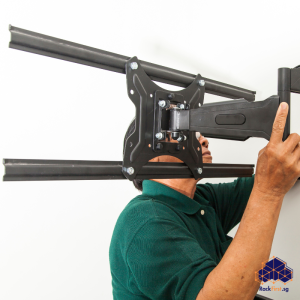
The pursuit of the ultimate gaming setup in space-conscious Singapore has reached new heights—literally. The trend of the wall mounted gaming pc represents a dramatic shift from traditional tower-on-desk arrangements, freeing up precious floor and desk space while turning your hardware into a striking piece of living art. This approach, however, demands careful planning, especially within the context of HDB regulations and Singapore’s unique environmental factors. This guide provides a thorough examination of everything you need to know, from selection to installation, ensuring your Singapore wall mounted gaming CPU setup is both spectacular and secure.
Understanding the Allure of a Wall-Mounted Gaming Rig
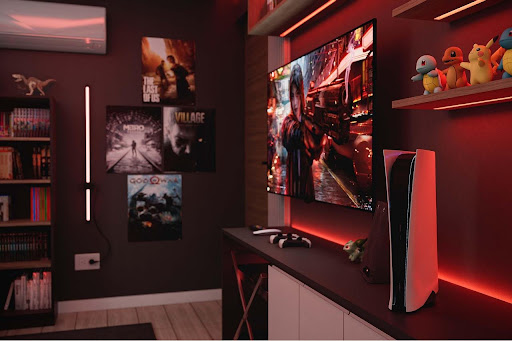
A wall-mounted gaming PC saves space and fundamentally changes the relationship between the gamer and their machine. By elevating the computer off the floor, you drastically improve airflow around the components, potentially lowering operating temperatures and enhancing system longevity. This setup also puts the intricate beauty of your hardware—the glowing RGB lights, the custom cooling loops, the graphics card design—on full display, transforming the PC into a central decorative element. For many, it represents the pinnacle of a custom-built gaming experience, a clear statement of passion and technical appreciation.
The Distinct Needs of a Gaming PC Wall Mount
Differentiating a standard computer mount from a gaming PC mount is important. A typical office computer is relatively lightweight and generates minimal heat. A dedicated gaming monitor wall mount and PC mount, on the other hand, must handle a significantly heavier and hotter system. A high-end graphics card alone can weigh over two kilograms and emit substantial heat. Therefore, a gaming PC mount must have a higher weight tolerance, often exceeding 30kg, and be constructed from metals that can withstand prolonged exposure to heat without degrading. The design must also prioritize an open structure that does not impede the natural convection of heat away from the CPU and GPU, a factor irrelevant for most office computers.
Selecting Your Wall-Mounted PC Chassis and Components
The heart of this project is the chassis. Unlike a standard case, a wall-mounted frame is an open-air platform designed to be seen from all angles. Your selection process should prioritize material quality, layout compatibility, and overall weight capacity. Look for frames made from thick, brushed aluminum or powder-coated steel that can support the substantial weight of a high-end graphics card without flexing. You must also verify that the mounting holes align with your motherboard’s form factor (ATX, micro-ATX, ITX). Component choice becomes part of the aesthetic; you may invest in custom-sleeved cables, more visually appealing air coolers, or even liquid cooling with clear tubes and coloured coolant to create a cohesive look.

A Guide to Gaming PC Wall Mount Types
Choosing the correct mount is a critical safety and design decision. Not all mounts serve the same purpose, and your choice will depend on your desired aesthetic and functional needs.
| Mount Type | Description | Best Use Cases |
|---|---|---|
| Fixed Mount | A rigid bracket that holds the PC frame flush against the wall. | Ideal for a permanent, minimalist display. Offers maximum stability and is the simplest to install. Perfect for setups where the PC will not be frequently accessed for upgrades or cleaning. |
| Tilting Mount | Features a hinged design that allows the entire PC to be tilted away from the wall. | Excellent for easier access to the back of the motherboard for cable management or component swaps. Also useful for directing heat away from the wall. |
| Swivel Mount | Provides a full range of motion, allowing the PC to be rotated left and right. | The best choice for flexibility. Allows you to angle the PC towards your seating area for a better view or to swivel it away when not in use. |
| Floating Shelf Mount | A sturdy, cantilevered shelf that the PC frame is secured to. | Creates a dramatic “floating” effect. It often has a larger footprint, which can provide a more grounded, substantial look and extra space for peripherals. |
Critical Considerations for a Singapore Wall Mounted Gaming CPU Setup
Mounting a computer in Singapore presents specific challenges that do not affect standard setups. The primary concern is humidity. Singapore’s consistently high humidity levels can accelerate dust accumulation and, more worryingly, promote corrosion on exposed metal contacts and components over time. An open-air chassis requires more frequent, meticulous cleaning to prevent conductive dust bunnies from causing short circuits. Furthermore, the lack of case fans means you rely entirely on the individual component coolers; ensuring you have a positive air pressure setup with well-placed intake and exhaust fans on the radiator becomes non-negotiable for effective cooling.
Navigating HDB Drilling Regulations and Wall Integrity
Before you even pick up a drill, understanding the rules is important. HDB guidelines strictly prohibit drilling into structural beams and columns, as these are critical to the building’s integrity. You must only drill into non-structural partition walls. The second major factor is identifying wall composition. HDB walls are typically either reinforced concrete (for structural walls) or brick/lightweight concrete blocks (for partition walls). Drilling into a reinforced concrete wall requires a more powerful hammer drill and specific masonry bits. Most importantly, you must locate and avoid electrical wires and plumbing conduits buried within the wall. Using a stud and wire detector is an essential step that prevents costly and dangerous accidents.
Step-by-Step Guide to Mounting Your Gaming PC
A successful installation is a methodical one. Rushing this process risks damaging your wall, your expensive PC components, or both.
| Step | Details |
|---|---|
| Step 1: Finalize Placement and Scan the Wall | Decide on the exact height and location for your PC. Use a stud finder or a multi-scanner to map out the wooden studs or metal frames within the wall. Simultaneously, scan the entire area for any signs of hidden electrical wires or pipes. |
| Step 2: Mark and Pre-Drill Pilot Holes | Hold the mounting bracket firmly against the wall in the desired position. Use a spirit level to ensure it is perfectly horizontal. Mark the drilling points with a pencil. Select a drill bit slightly smaller than the diameter of your wall plugs and carefully drill the pilot holes to the required depth. |
| Step 3: Install Wall Anchors and Secure the Bracket | Insert the appropriate wall plugs (anchors) into the pilot holes. For heavier setups, consider using metal toggle bolts that provide a much stronger grip on hollow walls. Align the mounting bracket with the anchors and use the provided screws to fasten it securely to the wall. Apply firm pressure to ensure no movement. |
| Step 4: Assemble the PC onto the Chassis Frame | This step is often easier done on a flat, non-conductive surface like a wooden table. Install the motherboard, power supply, graphics card, and storage drives onto the open-frame chassis according to the manufacturer’s instructions. |
| Step 5: Attach the Chassis to the Wall Mount | With assistance, carefully lift the assembled PC and hook or bolt the chassis onto the secured wall bracket. Double-check that all locking mechanisms on the mount are fully engaged. |
| Step 6: Connect Cables and Manage Them Neatly | Connect the power cable, your gaming monitor wall mount cables, and all peripherals. Use adhesive-backed cable clips, sleeving, or raceways to route cables neatly along the wall back to your desk. A clean cable management job is crucial for both safety and the final aesthetic. |
Need a secure, damage-free wall-mounted PC frame installation in your HDB flat? FixFirst’s certified handymen use professional tools and HDB-compliant techniques to ensure your mount is level, stable, and safe
Why Choose a FixFirst Handyman To Install Your Wall-Mounted Gaming PC
While a DIY approach can be tempting, entrusting this task to a FixFirst professional offers undeniable advantages that protect your investment and your home.
✔️ Expertise in HDB Wall Composition: Our handymen possess extensive knowledge of HDB construction methods. They can quickly identify wall types and locate the safest, most secure points for mounting, ensuring full compliance with HDB renovation guidelines.
✔️ Professional-Grade Tools and Fasteners: We arrive equipped with high-torque drills, precise stud detectors, and, most importantly, the correct heavy-duty wall anchors and bolts rated for your specific PC’s weight. This eliminates the guesswork and risk associated with consumer-grade hardware.
✔️ Flawless Cable Management and Electrical Safety: We do more than just mount the PC. Our technicians expertly manage all associated cables, securing them safely away from potential damage and creating a tidy, professional appearance that also reduces trip hazards and interference.
✔️ Guaranteed Security and Peace of Mind: The primary concern with a wall-mounted PC is safety. Our installation ensures that your valuable hardware is anchored immovably. We provide a guarantee on our workmanship, giving you the confidence that your prized gaming rig will remain securely on the wall.

Frequently Asked Questions (FAQs) about Wall-Mounted Gaming PC in Singapore Homes
The capacity varies greatly. A partition wall with proper heavy-duty anchors can often hold 20-30kg securely. However, the final capacity depends on the wall’s material and the quality of the anchors used. A professional assessment is always recommended for heavy, valuable equipment.
Yes, it is safe, but only if you use the correct type of anchors, such as toggle bolts or snap toggles, which distribute the weight across a wide area behind the drywall. Standard plastic plugs are completely inadequate for this task.
You will need to clean it more frequently than a standard case. Use a can of compressed air to blow dust off components gently. For more stubborn dust, use a soft, anti-static brush. Always power down and unplug the system before cleaning.
Generally, no. Most component warranties are voided by physical damage or modifying the product, not by how you mount them. However, we recommend checking the specific terms of your motherboard and graphics card warranties.
No, you cannot. You need a specific open-frame or “test bench” style chassis that is designed with integrated mounting points for this purpose. Standard enclosed PC cases are not meant to be wall-mounted.
Mount it high enough to be out of the way of foot traffic and potential bumps, but low enough that you can still easily access the rear I/O panel for connecting USB devices or making other changes. A height between 1.5 to 1.8 meters from the floor is often a good range.
This requires strategic cable management. You will run longer cables (HDMI/DisplayPort, USB extensions, power) from your desk to the PC. Use cable channels or sleeves to bundle these cables together and run them neatly along the wall to the mounted PC.
In theory, yes, because it operates in an open-air environment without the restrictions of a case. However, this depends on your ambient room temperature and the effectiveness of your individual component coolers. There are no case fans to create a directed airflow, so component cooler selection is key.
Transforming your gaming space with a wall-mounted PC is an ambitious project that merges technology with interior design. It demands a meticulous approach to selection, a respect for your home’s structure, and a precision-focused installation. While the visual and performance rewards are immense, the margin for error is small. A secure installation protects not just your hardware, but your entire household.
Do not leave the safety of your high-value gaming investment to chance. Trust the professionals at FixFirst to handle your wall-mounted PC installation with the technical skill and careful attention it demands. Contact us over Whatsapp today to schedule your installation and achieve a setup that is as safe and secure as it is stunning.