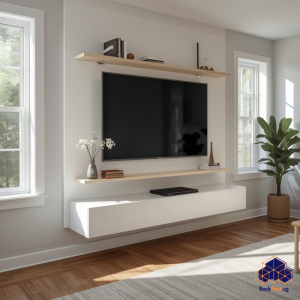
The allure of a sleek, space-saving television setup is undeniable, especially in our compact Singapore homes. A full-motion TV wall mount offers the ultimate viewing flexibility, allowing you to tilt, swivel, and extend your screen for the perfect angle from any spot in the room. Yet, the process of securely attaching this hardware to your wall, particularly in an HDB flat, demands precision and an understanding of local building regulations. This comprehensive guide will walk you through every consideration, from selecting the right bracket to the final safety check, ensuring you understand exactly how to install a full motion TV wall mount correctly and with confidence.
What Exactly is a Full-Motion TV Wall Mount?
Often called an articulating mount, a full-motion TV wall mount is the most versatile type of television bracket available. Unlike fixed mounts that hold the TV flat against the wall or tilting mounts that only allow for vertical angle adjustments, a full-motion model features multiple hinged arms. This design grants you a significant range of motion: you can pull the TV away from the wall, swing it left or right, and tilt it up or down. This functionality is a game-changer for open-plan living areas or bedrooms, enabling you to watch TV from the dining table, the kitchen, or adjust the screen to combat glare from Singapore’s bright sunlight. When you are deciding on a mount for a large screen, such as a 65 full motion TV wall mount, this articulating design provides the necessary flexibility to make the most of your investment.
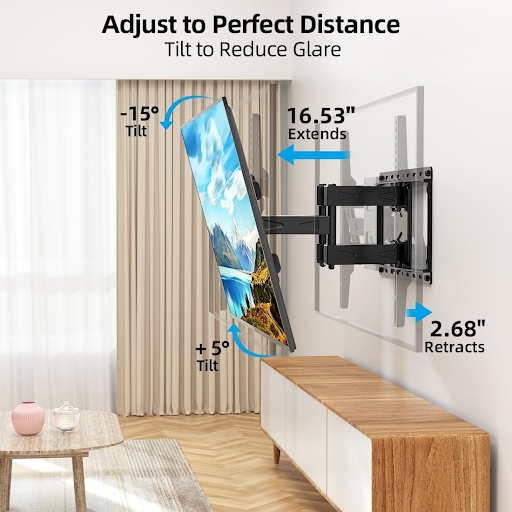
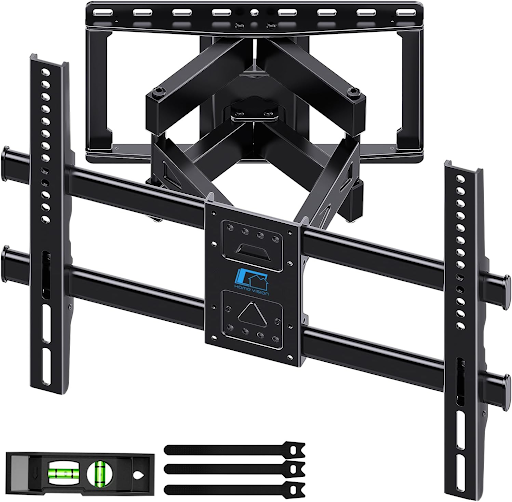
HOME VISION Full Motion TV Wall Mount Bracket for 32-85 Inch TVs (VESA 600x400mm)
Critical Pre-Installation Considerations for HDB Living
Before you pick up a drill, a successful installation hinges on thoughtful preparation. In Singapore’s unique housing context, this means going beyond simple measurements.
Navigating HDB Renovation Guidelines: The Housing & Development Board has strict rules regarding renovations to maintain the structural integrity of its buildings. Drilling into walls is a primary concern. You must avoid drilling into structural beams and columns at all costs. Furthermore, the HDB explicitly prohibits cutting or chasing into walls, which includes creating deep channels for cables. Always consult the official HDB renovation guidelines before commencing any work. For a project like installing a full motion tv wall mount Singapore homeowners must be extra vigilant about these rules to avoid costly fines and compromise the safety of their home.
Identifying Your Wall Type: HDB and condominium walls in Singapore are typically either reinforced concrete or brick. Reinforced concrete is exceptionally hard and requires a powerful hammer drill and specific masonry bits. Brick walls are softer but still demand the right tools. A critical step is using a professional-grade stud finder to locate the concrete beam within the wall. This beam is the only structurally sound point to anchor your mount; plasterboard or hollow brick alone cannot support the significant weight and leverage of an extended television.
Choosing the Correct Mount for Your Television: The mount must be rated to support both the weight and the size of your TV. Using an under-specified bracket is a severe safety hazard. Check your television’s manual for its exact weight and VESA pattern—the standardized spacing of the four mounting holes on the back of the TV. A 70 inch TV wall mount full motion will have a much higher weight capacity and a larger VESA compatibility range than a bracket designed for a smaller screen. Never attempt to use a mount that is not explicitly rated for your specific TV model and size.
Tools and Materials You Will Need for the Job
Gathering the correct tools beforehand streamlines the entire process. You will need a hammer drill, a set of high-quality masonry bits, a spirit level, a stud finder, a socket wrench set, screwdrivers, a tape measure, and masking tape. The mounting kit itself should include the bracket, bolts for the TV, lag bolts or concrete anchors for the wall, and spacers. For a large installation like a 75 inch TV wall mount full motion, we highly recommend a second pair of hands to assist with holding the bracket and lifting the TV.
The Step-by-Step Guide on How to Install a Full Motion TV Wall Mount
Follow these steps meticulously to ensure a secure and level installation.
| Step | Details |
|---|---|
| Step 1: Locate the Wall Studs and Mark the Position | Use your stud finder to identify the solid concrete beam in the wall. Once located, hold the wall plate of the mount against the wall in your desired position. Use a spirit level to ensure it is perfectly horizontal, then mark the drilling points onto the wall with a pencil. Placing masking tape on the wall before marking can help prevent the drill bit from slipping. |
| Step 2: Drill the Pilot Holes | Attach the appropriate masonry bit to your hammer drill. The bit’s diameter should match the size of the wall anchors you are using. Drill straight into the wall at each of your marked points to the depth required by the anchors. Be prepared for the force of the drill and wear safety glasses. |
| Step 3: Install the Wall Anchors and Secure the Bracket | Tap the provided concrete anchors or chemical anchors into the pre-drilled holes. These anchors expand within the concrete, creating an incredibly strong hold. Carefully align the wall plate with the anchors and use your socket wrench to tighten the lag bolts firmly. Do not overtighten, but ensure the bracket has no play or wobble. |
| Step 4: Attach the Mounting Arms to the Television | Lay your television face-down on a soft, protected surface. Attach the mounting arms to the back of the TV using the provided bolts and spacers. The spacers are crucial as they create a small gap between the TV and the arms, preventing pressure damage to the screen. |
| Step 5: Lift and Connect the Television to the Wall Bracket | This is a two-person task, especially for larger sets. Carefully lift the TV and guide the mounting arms onto the wall plate. You should hear a distinct click or feel a secure lock when the TV is properly engaged. Always refer to the mount’s manual for the specific locking mechanism. |
| Step 6: Conduct a Final Safety Check and Cable Management | Before letting go, gently test the stability of the installation. Check all articulation points—tilt, swivel, and extension—to ensure they move smoothly and are securely locked in place when released. Finally, use cable ties or a conduit to neatly route and secure all power and HDMI cables, keeping them out of sight and preventing tripping hazards. |
Need help installing a heavy-duty TV wall mount in your HDB flat? FixFirst’s certified handymen provide professional, damage-free installations on concrete walls. We ensure your mount is securely anchored, perfectly level, and safely connected—so you can enjoy a sleek, clutter-free entertainment setup with complete peace of mind.
Best Practices for Positioning and Viewing Ergonomics
The ideal viewing height is at or slightly below eye level when you are seated. With a full-motion mount, you have the freedom to set the TV in a neutral position and then adjust it as needed. Consider the room’s primary seating arrangement and the path of natural light to minimize reflections. The ability to pull the TV out and angle it makes a 70 inch TV wall mount full motion an excellent solution for corners, as it can effectively open up the viewing area for the entire room.
Navigating Common Installation Challenges
You may encounter obstacles like uneven walls, which require special spacers to ensure the bracket sits flush. If you accidentally drill into a hollow area, you must abandon that hole and reposition the bracket, filling the mistake with a suitable filler. The most common challenge is the sheer weight of large televisions; a 75 inch TV wall mount full motion assembly is heavy and cumbersome, underscoring the need for a helper and the correct wall anchors. If you are ever in doubt, it is always wiser to pause and seek professional assistance.
How To Remove TV from Full Motion Wall Mount
There will come a time when you need to clean, re-decorate, or upgrade your television, making it essential to know how to remove TV from full motion wall mount. The process is essentially the reverse of installation but requires equal care. First, disconnect all cables. Have a helper support the weight of the TV. Locate the locking mechanism on the mount. This is often a safety latch or a pull-pin. Release the lock according to the manufacturer’s instructions. With the lock disengaged, you can then carefully lift the TV straight up and off the wall plate. Knowing how to remove TV from full motion wall mount safely prevents damage to your screen and avoids personal injury.
Why a Professional Installation is Often the Wisest Choice
While a DIY approach can be tempting, the risks involved in mounting a heavy, expensive television are significant. A professional handyman brings the right tools, expertise in identifying HDB wall structures, and the experience to handle large, fragile items safely. They ensure that the installation, whether for a 65 full motion TV wall mount or a larger model, is not only secure but also complies with all HDB regulations, giving you absolute peace of mind.
Mastering how to install a full motion TV wall mount transforms your living space, offering unparalleled viewing flexibility and a clean, modern aesthetic. However, the task involves precise planning, a respect for your home’s structure, and a meticulous approach to safety. For Singapore residents, adhering to HDB guidelines is essential. If the process of drilling into concrete, handling a heavy full motion tv wall mount Singapore specific installation, or simply ensuring a perfect, worry-free result seems daunting, remember that expert help is readily available.
Do not leave the safety of your family and your expensive television to chance. Contact FixFirst today to schedule a professional TV wall mount installation. Our skilled technicians have the expertise and tools to get the job done right, guaranteeing a secure and flawless setup for your home.