High-end models of ceiling fans, when they start to develop issues, are generally still worth your while to repair and be given a second lease in life. You may engage a professional home appliance service specialist to get to the bottom of your malfunctioning ceiling fan, in the same way you would in case of fridge repair or washing machine repair issues.
Meanwhile, it also helps to know the likely causes of the most common ceiling fan problems such as stuck fan blades and weird noises from the fan motor. Below is the general troubleshooting procedure to cover most ceiling fan issues.
- Check the switch and power supply. This is always the first thing to focus on if your fan suddenly stops working. Look at the fuse in the circuit breaker box and ensure there’s electricity in the circuit where the ceiling fan is connected. You can also try resetting the circuit breaker. If the fan switch is faulty, then you’re basically all good since a switch is not that expensive to replace.
- Troubleshoot the fan motor. Switch the fan off and then unplug it. Use a screwdriver to remove the fan housing. Once the motor is fully exposed, check for any tangled, loose, or burnt wiring. It is infinitely safer to just replace damaged wires than to use electrical tape to try to patch them up. If you have a circuit tester, you can use that to verify power issues with the fan motor. And if you can narrow down the problem to a defective fan motor, weigh carefully if it’s more cost effective to just buy a new ceiling fan altogether.
- Take a look at the fan’s speed control mechanism. You can easily find the ball bearings of the ceiling fan’s speed control. Clean and lubricate them. If the internal bearings of the fan motor are damaged, you will be able to tell quickly because the motor housing will become way too hot while the fan is running. Replacing defective fan motors, not repairing them, is always the go-to course of action.
- Replace the capacitor of the fan, if the speed levels do not look normal to you and if you notice yellowing or any discoloration on the capacitor. It’s easy to replace a capacitor with a new one. It’s also cheap to buy a new capacitor, too. Simply make note of the wiring that goes into the old capacitor, remove it, and put the new capacitor in place.
- Check for any loose screws. Just run through all of them and tighten all the screws.
Any shaking of a ceiling fan is potentially dangerous and should be dealt with promptly. If your ceiling fan begins to shake, turn it off right away and disconnect it from the power outlet. The first thing to do is to check the fan for loose screws, especially on the mounting bracket. Check if the support beam and the fan attachment are securely fitted together. Lastly, check the power outlet you are using if it is correctly rated for the ceiling fan’s capacity.

Why Choose a Professional for Your Ceiling Fan Repair?
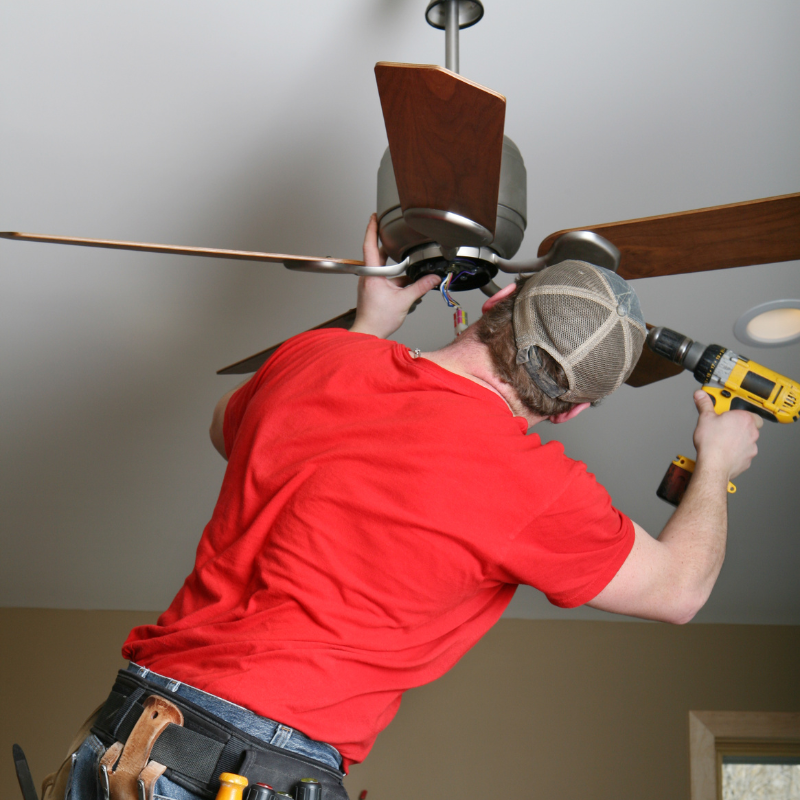
Attempting a DIY ceiling fan repair might seem like a cost-saving measure, but the risks far outweigh the benefits. Ceiling fans involve electrical wiring, mechanical components, and precise balancing—all of which require specialized knowledge. A single misstep can lead to electrical shocks, improper installation causing wobbling or detachment, or even long-term damage to your fan’s motor. Unlike changing a lightbulb or tightening a loose screw, ceiling fan repairs demand technical expertise that only a trained professional possesses.
Professionals bring more than just tools; they bring experience. They diagnose issues quickly, whether it’s faulty wiring, a failing capacitor, or imbalanced blades, and apply proven solutions. DIY enthusiasts often rely on online tutorials, but these guides can’t account for every fan model or hidden electrical hazard. Worse, amateur repairs may void warranties or violate Singapore’s electrical safety standards, leaving homeowners liable for future damages.
Safety is another critical factor. Working at height on a ladder while handling electrical components is a recipe for accidents. Professionals use proper safety gear, secure mounting techniques, and follow stringent protocols to prevent injuries or property damage. Moreover, an improperly secured fan can detach from the ceiling over time, posing a serious risk to anyone below.
Beyond immediate hazards, a poorly repaired fan operates inefficiently, consuming more energy and shortening its lifespan. Professionals ensure optimal performance, keeping your home cool without unnecessary power spikes. They also spot underlying issues—like outdated wiring that needs to be upgraded or even insufficient support—that DIYers might miss.
In the long run, hiring a professional saves time, money, and stress. What starts as a simple fix can spiral into costly repairs if handled incorrectly. Trusting an expert guarantees a safe, lasting solution, so you can enjoy a smoothly running fan without the risks of DIY experimentation.
Frequently Asked Questions (FAQs) – Ceiling Fan Repair
At FixFirst, we specialize in a wide range of ceiling fan singapore repair services, including:
- Motor repairs. Fixing or replacing faulty ceiling fan motors.
- Blade repairs. Repairing or replacing damaged or unbalanced fan blades.
- Wiring repairs. Addressing electrical issues such as faulty wiring or connections.
- Remote control repairs. Fixing or replacing malfunctioning remote controls.
- Noise troubleshooting. Diagnosing and fixing unusual noises (e.g., humming, clicking, or rattling).
- Speed control repairs: Resolving issues with fan speed settings.
Light kit repairs. Repairing or replacing faulty light kits attached to ceiling fans.
Common signs that your ceiling fan needs repair include:
- The fan is not spinning or spins slowly.
- Unusual noises (e.g., grinding, buzzing, or clicking).
- Wobbling or shaking during operation.
- The fan doesn’t respond to the remote control or wall switch.
- The light kit (if applicable) is not working.
- Burning smells or sparks coming from the fan.
Yes, we offer free, no-obligation estimates for all our ceiling fan repair services. Contact us to schedule an assessment, and we’ll provide a detailed quote based on your specific needs.
The duration of a ceiling fan repair project depends on the issue and the availability of replacement parts. On average:
- Minor Repairs (e.g., blade balancing or remote control fixes): 1–2 hours
- Moderate Repairs (e.g., wiring or light kit repairs): 2–3 hours
- Major Repairs (e.g., motor replacement): 3–4 hours
We always strive to complete repairs as quickly as possible to minimize inconvenience.
Yes, we have experience repairing a wide range of ceiling fan brands and models, including KDK, Panasonic, Hunter, Fanco, Crestar, and many more. If you’re unsure about your fan model, our technicians can identify it during the assessment.
The light selector on a ceiling fan lets you control multiple functions—like fan speed and integrated lighting—from a single wall control or remote. This selector operates a small internal switch or microcontroller that directs power to either the fan motor, the light kit, or both. When you turn the knob or press a button, it interrupts the electrical circuit in one part and feeds power to the other. Modern selectors often include dimming circuits, enabling you to adjust brightness in steps or smoothly. This setup provides seamless convenience because it eliminates the need for separate switches for the fan and light. Technicians typically install a dual-switch wall plate or wire a remote receiver directly into the fan’s canopy to support this. The result feels intuitive: one control that does it all.
A ceiling fan with an integrated light kit combines two electrical appliances into a unified unit. Inside the fan canopy, a dual-circuit power system separates the fan motor from the light. The fan motor features wiring for various speed settings, and the light kit connects to a bulb socket or LED driver. When you activate the light, the circuit energizes the lamp while the motor circuit stays idle, and vice versa. The result feels effortless: one pull chain or remote communicates with the motor, another controls the light. Some smart fans also include Bluetooth or Wi‑Fi controls, allowing smartphone or voice commands. In essence, a ceiling fan with light functions like two devices in one.
When you change a ceiling fan light, safety and planning take center stage. First, power off the fan at your circuit breaker. Let the unit cool if the bulb’s been recently on. Then gently remove the light kit cover—usually held by screws or a twist-lock mechanism—exposing the bulb. Swap the old bulb with a fresh one of the correct wattage and type. For incandescent or CFL bulbs, choose the same size and wattage; for LED upgrades, ensure the new bulb fits the fixture and matches the fan’s wattage rating if the fan includes a dimmer function. Screw in the new bulb until snug, reattach the cover, then restore power. Switch on to confirm everything works as expected.
Upgrading to an LED module adds energy efficiency and longevity. Whether the fan has a replaceable LED bulb or an integrated LED board (driver and chipset enclosed), the key steps remain consistent: ensure safety, remove the light cover, and replace the LED component. If your fan uses a standard LED bulb, unscrew it and screw in the new one, respecting the voltage and base type. If it includes a sealed LED board, the process involves disconnecting a plug or unscrewing the module. Installation varies by brand but typically requires mirroring the original orientation and securely fastening screws and connectors. Finally, reattach the cover, restore power, and enjoy improved lighting and lower energy costs.
KDK ceiling fans often feature integrated LED boards rather than replaceable bulbs. Begin by cutting power to the fan. Remove the light diffuser—typically held by clips or screws—then unscrew the LED module from the light fixture. This module will be hard-wired, so disconnect the wires by unscrewing the terminal block or unplugging a connector. Attach the replacement LED board, ensuring wire colors match (usually red/black for live, white for neutral), and tighten the screws or secure the plug. Align the diffuser and secure it tightly. Finally, power on the circuit breaker and test your fan light. If the new LED refuses to light, double-check wiring and make sure the replacement is compatible with KDK’s voltage and driver specifications.
Swapping a traditional light bulb (incandescent, CFL, or LED) in your ceiling fan closely mirrors the general “change ceiling fan light” method. Switch off the breaker, let the bulb cool, then remove the glass or acrylic shade. Unscrew the old bulb counterclockwise and replace it with a new one of the same type and base. Tighten the new bulb until it’s snug but not overly firm. Replace the shade and turn power back on. If the fan includes a dimmer, test each setting to confirm compatibility. Old fan dimmer circuits sometimes interfere with newer bulb technology, so flickering or uneven dimming may require a low‑wattage replacement or updated dimmer-compatible bulb.
Fanco ceiling fans typically hide the light cover behind a twist-lock system or lock-and-release clips. After you switch off the fan at the breaker and let the bulb cool, examine the closet boundary between the shade and the light housing. Rotate the cover counterclockwise by about a quarter turn until it loosens, or locate two small side clips that release when gently pressed inward. Avoid using tools: Fanco uses hand tools only. Once loose, carefully lower the cover to reach the bulb or LED.
Replacing a Fanco ceiling fan light starts with removing the old bulb or LED module just as described. After you open the cover, gently unscrew the bulb or unsnap the LED plate if installed. Carefully insert the new bulb or module, ensuring connector compatibility. When replacing a compact LED board, align screw holes, refasten screws, and match the wiring color for accurate installation. Finally, snap or twist the diffuser back into place. Restore power and test the light before reattaching any external decorative elements. Fanco designs make this process user-friendly, so most homeowners can do it in 10–15 minutes with no specialized tools or professional help required.
For safety reasons, we recommend turning off the power to the ceiling fan at the circuit breaker before the repair. Our technicians will also take necessary precautions to ensure a safe working environment.
Yes, we can diagnose and repair issues with ceiling fan remote controls. This may involve replacing the remote, fixing the receiver, or addressing wiring problems.
If your ceiling fan is still under warranty, we recommend checking with the manufacturer first, as repairs by unauthorized technicians may void the warranty. However, if the warranty has expired or doesn’t cover the issue, we’re here to help!
The cost of ceiling fan repair varies based on factors like the issue, the brand and model of the fan, and the cost of replacement parts. Our free estimates will provide a clear breakdown of costs.
Yes, we understand that ceiling fan repairs can be urgent. We offer flexible scheduling, including evenings and weekends, to minimize disruption to your routine.
Yes, we repair ceiling fans in both residential and commercial settings, including HDB flats, condominiums, offices, and retail spaces. We adhere to all necessary guidelines and regulations.
Customer satisfaction is our top priority. If you’re not happy with the results, let us know, and we’ll make it right. Our team will address any concerns promptly and professionally.
Certainly! Here are a few tips to keep your ceiling fan in good condition:
- Clean the fan blades regularly to prevent dust buildup.
- Tighten any loose screws or bolts to reduce wobbling.
- Lubricate the motor (if applicable) as per the manufacturer’s instructions.
- Check and replace worn-out remote control batteries.
- Inspect the wiring and connections periodically for signs of wear.
Getting started is easy! You can call or Whatsapp us at 89107700 or email us at admin@fixfirst.sg. We’ll schedule a consultation, provide a free estimate, and plan your appliance repair project according to your needs.
Yes, we can repair or replace faulty light kits attached to ceiling fans. Our team will diagnose the issue and provide the best solution to restore functionality.
Yes, we have experience repairing vintage and older model ceiling fans. While replacement parts may be harder to find, we’ll do our best to restore your fan to working condition.
We provide ceiling fan repair services across Singapore. Contact us to confirm availability in your area.
If you have any additional questions or need further assistance, feel free to reach out to our friendly team at FixFirst. We’re here to make your ceiling fan repair experience seamless and stress-free!