The living room in a Singapore HDB flat serves many purposes. It is a space for family gatherings, a backdrop for entertaining guests, and increasingly, the home entertainment hub. For years, the standard approach placed a television on a console or cabinet, with the TV cabinet occupying valuable floor space and often becoming a catch-all for clutter. This traditional setup, while functional, rarely achieves the clean, uncluttered aesthetic that many homeowners now desire.
A better approach integrates the television with storage or display elements directly on the wall. Combining a wall-mounted television with floating shelves creates a unified system that eliminates bulky furniture, opens up floor space, and provides a curated platform for decorative items, media components, or personal collections. This configuration, known as a wall mounted TV with floating shelves, has gained significant traction in Singapore for its ability to make a room feel larger and more intentional.
Executing this installation correctly requires more than hanging a TV and attaching a few shelves. It demands an understanding of HDB regulations, careful selection of mounting hardware, precise alignment, and consideration of cable management and structural support. This guide covers every aspect of planning and installing a wall-mounted television paired with floating shelves, ensuring the final result is both visually striking and structurally sound.

Understanding HDB Regulations and Wall Types
Before any drilling begins, you must understand what the Housing & Development Board permits and what lies behind your walls. HDB regulations exist to protect the structural integrity of the building and to ensure the safety of all residents . Ignoring these rules can result in fines, forced removal of fixtures, or complications when selling the flat.
HDB walls fall into three main categories. Concrete load-bearing walls form the building’s structural frame. You may drill small holes into these walls for mounting fixtures, but you cannot hack, cut, or significantly alter them. Dry partition walls are non-structural and common in newer flats. Drilling into these is permissible, but you must use appropriate hardware designed for hollow walls or anchor directly into the metal or wood studs behind the plasterboard. Brick walls appear in older HDB estates. Drilling into brick is allowed, but requires a hammer drill and masonry bits to penetrate without causing cracks .
Concealed electrical wiring and water pipes pose a hidden risk. In HDB flats, wiring typically runs vertically or horizontally from existing sockets and switches. As a general rule, avoid drilling directly above, below, or beside any electrical point. A stud sensor or wire detector is an essential tool for this project, allowing you to confirm that your intended mounting zones are free of hazards before drilling .
Noise restrictions also apply. Drilling and other renovation works are permitted only between 9:00 AM and 5:00 PM on weekdays, with no noisy works allowed on Saturdays after 1:00 PM, Sundays, or public holidays. A project of this scale—drilling multiple holes for both the TV mount and shelves—will generate a lot of noise, so scheduling within these hours is necessary for compliance and neighborly relations.
Selecting the Right TV Mount for Your Space
The television mount forms the foundation of the entire installation. Selecting the wrong mount can compromise safety, viewing experience, or the final aesthetic. Several factors determine the appropriate mount for your situation.
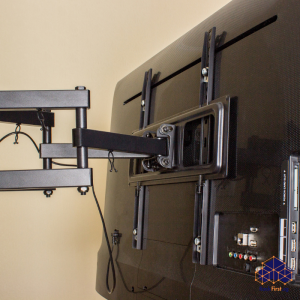
Mount type is the first consideration. Fixed mounts hold the television flat against the wall, creating the slimmest profile. This option works well when the viewing position is directly in front of the screen. Tilt mounts allow the screen to angle downward, which benefits installations where the television sits higher than eye level. Full-motion or articulating mounts pull away from the wall, swivel left and right, and tilt up and down. These offer maximum flexibility but require more wall space and add depth to the installation.
Weight and size capacity must match your television. Check your TV’s specifications for weight and VESA pattern, the standardized mounting hole spacing on the back of the set. The mount must support at least the weight of the television, though selecting a mount rated for a higher capacity provides an additional safety margin.
Wall type compatibility dictates the hardware you will use. Concrete walls require masonry anchors and lag bolts. Drywall installations require lag bolts driven into studs. If studs do not align with your desired mounting location, a mount with a wide wall plate that spans multiple studs or a heavy-duty toggle bolt system designed for drywall becomes necessary.
Selecting and Positioning Floating Shelves
Floating shelves come in various materials, depths, and weight capacities. The shelves you choose must complement the television in both style and function while safely supporting the items you intend to display.
Material choices include solid wood, plywood with veneer, medium-density fiberboard (MDF), and glass. Solid wood offers the greatest strength and a natural aesthetic but tends to be heavier. MDF provides a smooth, paintable surface and consistent density but can sag under heavy loads if not properly supported. Glass shelves create a minimalist look but require careful handling and show dust readily.
Mounting hardware for floating shelves typically consists of hidden brackets or a rail system. Hidden brackets insert into the back of the shelf and attach to the wall, creating the illusion that the shelf floats. Rail systems use a metal strip mounted to the wall with brackets that slide into the back of the shelf. Both methods require precise drilling and level alignment.
Positioning relative to the television requires careful planning. Common configurations place the television at the center, with shelves flanking it on one or both sides, or position a long shelf directly beneath the television to serve as a media console replacement. When positioning shelves, consider the television’s viewing height first, then arrange shelves around it in a visually balanced composition. Asymmetrical arrangements can create visual interest, but the overall composition should feel intentional rather than random.
Weight limits matter significantly. A shelf loaded with books, speakers, or decorative objects imposes a constant downward force on its brackets. Exceeding the manufacturer’s weight rating risks the shelf pulling out of the wall, potentially damaging the wall and the items below. For shelves holding AV components such as soundbars, game consoles, or set-top boxes, verify that the shelf depth accommodates the equipment and that the mounting hardware supports the combined weight.
Planning the Layout and Marking the Wall
With the TV mount and shelves selected, the next phase involves planning the exact layout. This step determines the final visual harmony of the installation and ensures that drilling occurs in safe, structurally sound locations.
Start by determining the television’s viewing height. For most living rooms, the center of the screen should sit at or slightly below eye level when seated. This typically places the center of the television between 1050 millimeters and 1150 millimeters from the floor. Mark this center point on the wall with a pencil.
Using the television’s dimensions, mark the outline of the screen on the wall with painter’s tape. This gives you a visual reference for placing shelves around the television. Step back and assess the composition. Adjust the shelf positions until the arrangement feels balanced.
Once you finalize the positions, use a stud sensor to locate wall studs or confirm that the wall is solid concrete. Mark the locations of studs with tape. For concrete walls, the sensor can also help detect reinforcing bars (rebar) to avoid drilling directly into them.
Transfer the mounting hole locations from the TV mount’s wall plate and the shelf brackets onto the wall. Use a spirit level to ensure all marks align horizontally. Double-check all marks against your stud locations or sensor readings to ensure they avoid wiring and pipes.
Step-by-Step Installation Guide
With the layout marked and tools ready, the installation process begins. Proceed methodically to ensure accuracy and safety.
| Step | Details |
|---|---|
| Step 1: Confirm wall type and gather appropriate hardware | Review the floor plan to confirm the wall type. Gather masonry anchors and lag bolts for concrete, or heavy-duty lag bolts for stud mounting. Ensure you have the correct drill bits: carbide-tipped masonry bits for concrete, standard wood or metal bits for studs. |
| Step 2: Drill pilot holes for the TV mount | Set your drill to the correct mode—hammer mode for concrete, standard rotation for drywall or brick. Drill each pilot hole to the depth required by the screw length. For concrete, work slowly to prevent overheating the bit. Clear dust from each hole after drilling to ensure wall plugs seat correctly. |
| Step 3: Insert wall plugs and secure the TV mount wall plate | For concrete and brick walls, tap wall plugs into the holes until flush with the surface. For drywall studs, plugs are not needed. Align the wall plate with the holes and drive the screws in, tightening firmly. Do not overtighten, as this can strip the plug or crack the plaster. Use a spirit level to verify the plate remains level after tightening. |
| Step 4: Drill pilot holes for the floating shelves | Repeat the drilling process for each shelf bracket location. For shelves with hidden brackets, you may need to drill holes for the bracket pins or a rail system. Accuracy matters here: misaligned holes will result in shelves that do not sit level or flush against the wall. |
| Step 5: Secure the shelf brackets or rails | Insert wall plugs where needed and attach the shelf brackets or mounting rails to the wall. Use a spirit level to confirm each bracket or rail sits level before fully tightening the screws. For rail systems, ensure the rail is straight and securely fixed at multiple points. |
| Step 6: Prepare the television for mounting | With the wall plate secured, attach the mounting arms or brackets to the back of the television according to the mount manufacturer’s instructions. Use the correct screw length to avoid damaging the TV’s internal components. If your mount includes spacers, use them to maintain proper clearance. |
| Step 7: Mount the television | Lift the television with the help of another person. Align the arms with the wall plate and engage the locking mechanism. Most mounts click into place or require securing with set screws. Verify that the television is level and that the mount locks securely. |
| Step 8: Install the floating shelves | For shelves with hidden brackets, slide the shelf onto the brackets or pins. For rail systems, attach the shelf to the rail according to the manufacturer’s instructions. Ensure the shelf sits flush against the wall and remains level. If the shelf does not sit level, check the bracket alignment. |
| Step 9: Perform a safety test | Gently apply downward pressure to each shelf to confirm the brackets hold firmly. For the television, gently try to lift it off the mount to confirm it is locked. Apply light pressure to the edges to ensure the mount is stable. |
Planning a combined TV and shelving installation? FixFirst’s certified handymen handle both safely and precisely—on concrete, brick, or partition walls. We ensure perfect leveling, secure anchoring, and clean cable management. Book now for a sleek, clutter-free media wall.
Managing Cables for a Clean Finish
Several methods exist for cable management. The simplest uses paintable cable conduits that adhere to the wall. These channels run vertically from the television down to the shelves or floor, encasing power cords, HDMI cables, and other connections. Choose a conduit width that accommodates all cables and paint it to match the wall color for a discreet appearance.
For a truly flush finish, consider recessing cables into the wall. This involves cutting access points behind the television and near the floor or shelves to run cables through the wall cavity. For concrete HDB walls, this is generally not permitted, as it constitutes hacking into structural elements. For drywall partitions, it is technically possible but requires careful planning and compliance with fire safety codes.
The power cable presents a specific safety concern. Running a standard power cord inside a wall cavity violates fire safety codes. If you desire a completely concealed power connection, you must hire a licensed electrician to install a new power outlet behind the television location. This outlet must use in-wall rated cabling and comply with Energy Market Authority (EMA) regulations .
For installations where components sit on floating shelves, plan the cable routing carefully. Shelves placed directly beneath the television can conceal cables running from the TV down to the components. Group cables together using zip ties or Velcro straps to keep them organized.
Positioning for Optimal Viewing and Functionality
The television’s height and angle should accommodate the primary seating position. If you installed a tilt or full-motion mount, adjust the angle to reduce glare from windows or overhead lights.
Floating shelves should not obstruct the television’s viewing area or interfere with remote control signals. Place components such as soundbars, game consoles, or set-top boxes on shelves where they remain accessible for cable connections and do not block the television’s infrared sensor.
Consider the weight distribution on shelves. Place heavier items closer to the brackets, where the shelf receives the most support. Distribute weight evenly across the shelf to prevent sagging over time. For shelves holding AV equipment, ensure adequate ventilation around the components to prevent overheating.
The overall composition should feel balanced. If the television sits off-center relative to the shelves, the arrangement may feel unintentional. Step back and assess the visual weight of each element. Adjust the position of decorative items on the shelves to create a cohesive look.
When To Call a Professional
While a confident DIYer can complete this project, several factors warrant professional assistance. The combined weight of the television and loaded shelves imposes a lot of stress on wall fixings. Any error in drilling, anchor selection, or alignment can result in damage to the wall, injury, or destruction of expensive equipment. If you are uncertain about your wall type, the location of wiring and pipes, or the structural capacity of your walls, these are not risks to take lightly. A professional handyman carries stud sensors, wire detectors, and the proper tools for drilling into concrete or masonry.
HDB compliance is another consideration. While a simple TV mount may not require a permit, any associated electrical work—such as installing a new power outlet or relocating existing points—must be performed by an EMA-licensed electrician.
FixFirst provides experienced handyman services across Singapore who understand HDB regulations and the technical requirements of mounting televisions and shelving systems. They handle the entire process, from site assessment and layout planning to installation and cable management, ensuring the work meets safety standards and building codes.
Contact FixFirst today to schedule a professional installation and enjoy your wall mounted TV with floating shelves—installed securely, aligned perfectly, and ready for years of entertainment.