Space is at a premium in Singapore, especially in HDB flats, which is why more and more homeowners now turn to wall-mounted solutions to free up desk space and create a cleaner, more organized setup. Whether you want a computer wall mount Singapore setup for your monitor, keyboard, or entire workstation, proper installation is key to safety and functionality. This guide covers everything—from choosing the right computer wall mount system to step-by-step installation, best practices, and why hiring a professional handyman ensures the best setup.

Types of Computer Wall Mounts Available in Singapore
- Computer Monitor Wall Mounts
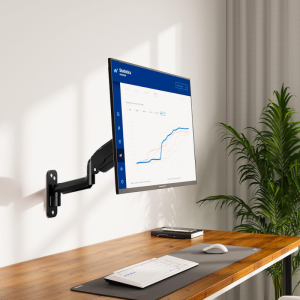
The most common type, a computer monitor wall mount, securely holds your display at eye level, reducing neck strain. Options include fixed brackets for a stationary setup or adjustable arms for flexible viewing angles.
- Computer Monitor Wall Mount Arm
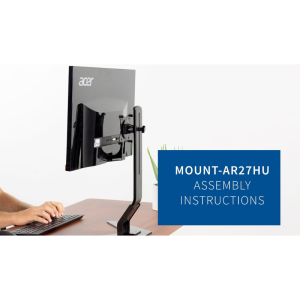
For those who need movement, a computer monitor wall mount arm allows swiveling, tilting, and extending the screen. Ideal for multi-monitor setups or ergonomic adjustments.
- Computer Shelf Wall Mount
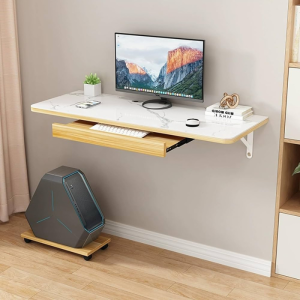
A computer shelf wall mount provides a floating surface for small desktops, laptops, or peripherals. Perfect for minimalist setups where desk space is limited.
- Wall Mounted Computer Desk
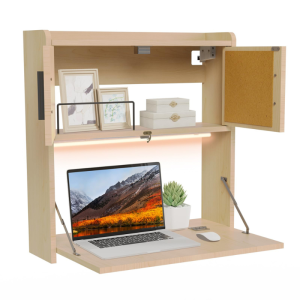
A full wall mounted computer desk integrates workspace and storage, folding away when not in use. Great for compact living areas.
- Computer Tower Wall Mount
A computer tower wall mount keeps the CPU off the floor, improving airflow and reducing dust buildup. Some models include sliding rails for easy access.
- Wall Mounted Computer Cabinet
For a sleeker look, a wall mounted computer cabinet conceals cables and hardware while maintaining accessibility.
- Computer Monitor Keyboard Wall Mount
A computer monitor keyboard wall mount combines display and input devices in one unit, ideal for standing desks or space-saving solutions.
- Computer Wall Mount Bracket
A basic computer monitor wall mount bracket offers a simple, low-profile solution for single-screen setups.
- Wall Mount Computer Case
For custom builds, a wall mount computer case turns your PC into a display piece, showcasing internal components while saving desk space.
Understanding VESA Patterns: The Standard for Computer Wall Mount Compatibility

What Are VESA Patterns and Why Do They Matter for Wall Mounts?
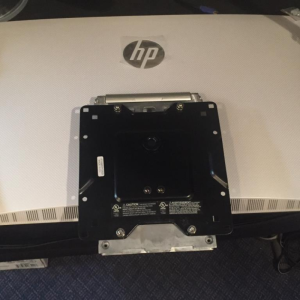
The Video Electronics Standards Association (VESA) established the Flat Display Mounting Interface (FDMI) standard, commonly known as the VESA pattern, to ensure uniformity in mounting solutions for monitors and TVs. A VESA pattern refers to the specific arrangement of mounting holes on the back of a display, measured in millimeters horizontally and vertically. This standardization allows consumers to confidently pair their screens with compatible wall mounts, desk stands, or articulating arms without worrying about fitment issues.
VESA patterns typically follow a square or rectangular layout, with the most common sizes being 75×75 mm, 100×100 mm, 200×200 mm, and 400×400 mm for smaller to mid-sized displays, while larger monitors and TVs may use 600×400 mm or even 800×400 mm. The pattern’s dimensions directly correlate with the display’s size and weight capacity, ensuring structural integrity when mounted. Manufacturers adhere to these specifications to maintain cross-compatibility across different brands and models, making VESA compliance a critical factor when selecting a wall mount.
How VESA Patterns Influence Wall Mount Selection
When choosing a wall mount for a computer monitor, verifying the VESA compatibility between the display and the mount is essential. Most mounts support multiple VESA patterns, often through adjustable brackets or interchangeable adapter plates. For example, a mount rated for 100×100 mm may also accommodate 75×75 mm displays using included spacers or alternate screw placements. However, larger or heavier monitors—particularly those used in gaming, graphic design, or multi-display setups—require mounts with higher VESA ratings to distribute weight effectively and prevent tilting or sagging over time.
The relationship between VESA patterns and mount types also affects functionality. Fixed mounts, which keep the display flush against the wall, generally support standard VESA sizes with minimal adjustability. In contrast, full-motion articulating arms, tilt mounts, and pole-mounted systems often feature dynamic brackets that conform to multiple VESA patterns while allowing for swivel, rotation, and height adjustments. This flexibility is particularly valuable in ergonomic workstation setups where screen positioning is crucial for reducing neck strain and optimizing viewing angles.
The Evolution of VESA Standards and Future-Proofing Your Setup
As display technology advances, VESA continues to refine its standards to accommodate new form factors, such as ultra-wide monitors, curved screens, and commercial-grade panels. The introduction of the VESA MIS-F (Mounting Interface Standard – Fixed) and MIS-D (Mounting Interface Standard – Dynamic) classifications further refines compatibility requirements, particularly for heavy-duty or multi-monitor configurations. Displays exceeding 100 pounds, for instance, often require reinforced mounting points and heavy-duty brackets that exceed traditional VESA dimensions.
For consumers, future-proofing a wall mount investment means selecting a model that supports a broad range of VESA patterns, even if their current monitor adheres to a smaller standard. Many premium mounts include universal compatibility up to 400×400 mm or higher, ensuring adaptability as users upgrade to larger or higher-resolution displays. Additionally, third-party VESA adapter plates can bridge compatibility gaps for non-standard displays, though users should verify weight limits and stability before installation.
Ultimately, understanding VESA patterns eliminates guesswork when pairing monitors with wall mounts, ensuring a secure, functional, and long-lasting setup. By prioritizing VESA compliance and anticipating future display needs, users can create optimized workspaces that combine aesthetics, ergonomics, and durability.
The Best Monitor Wall Mount: A Guide to Selection and Best Practices
Selecting the right support for your display is as critical as choosing the monitor itself. A superior mount not only declutters your workspace but also fundamentally enhances ergonomics, productivity, and viewing comfort. The quest for the best monitor wall mount is not about finding a single universal product, but about identifying the perfect synergy between your specific hardware, your spatial constraints, and your functional needs.
Key Considerations for the Ideal Mount
The foundation of a successful installation lies in compatibility. This is a non-negotiable first step.
📌 VESA Compliance – This is the universal language of mounting. The VESA standard (e.g., 75x75mm, 100x100mm, 200x200mm) refers to the pattern of four holes on the back of your monitor. You must match the mount’s bracket to your screen’s VESA pattern. Most brands like Dell, HP, and Samsung adhere to this, though some ultra-wide or unique models may require an accessory. For instance, certain Samsung models might need a specific Samsung monitor wall mount adapter to achieve VESA compatibility.
📌 Weight and Size Capacity – Every mount is rated for a maximum weight and screen size. Exceeding these limits compromises safety and function. A dedicated Samsung 49 inch monitor wall mount or a Dell monitor wall mount designed for large Ultrascreens will be engineered with a heavier weight capacity and a wider articulation range to accommodate the substantial size and heft of these premium displays. Similarly, a wall mount touch screen monitor must account for the additional force applied during interaction.
📌 Functionality and Articulation – Your workflow dictates the required mobility.
- Fixed or Tilting (PC monitor wall mount bracket): A simple, low-profile fixed bracket is cost-effective and ideal for a single screen set to a perfect viewing height. A tilting version adds minor adjustment for reducing glare.
- Articulating (Full Motion Monitor Wall Mount): This is the ultimate in flexibility. A full motion monitor wall mount typically features a height adjustable monitor wall mount function via a vertical rail, combined with a swivel monitor wall mount design that allows for left-to-right rotation and pull-out extension. This is essential for dynamic workspaces or corner setups.
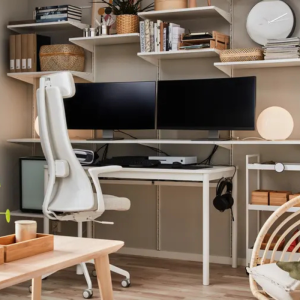
- Dual Configurations: For multi-screen productivity, a vertical dual monitor wall mount saves immense desk space while stacking screens efficiently. Some systems allow for a combination of landscape and portrait orientations.
Beyond the Spec Sheet: Engineering and Build Quality
While specifications are quantitative, quality is qualitative. The best mounts distinguish themselves through meticulous engineering. Look for independent certifications from standards organizations like UL or ETL, which validate safety claims. The internal mechanisms matter greatly; gas springs in a height adjustable monitor wall mount should provide smooth, consistent motion and hold their position securely without sagging. Joints should move with intentional resistance, not looseness, and all locking mechanisms should feel positive and secure. The finish should be a durable powder coat, resistant to chipping and scratching, ensuring longevity.
Installation Best Practices for a Secure Monitor Wall Mount
The mount is only as strong as its attachment to the wall. So, consider these best practices when mounting your monitor onto the wall:
📌 Wall Material Analysis: This is the most critical step. Identifying whether your wall is solid concrete, drywall (plasterboard) with or without studs, or a hollow partition is essential. For concrete, appropriate concrete anchors and a heavy-duty drill are mandatory. For drywall, you must locate the wooden or metal studs; drywall anchors alone are insufficient for the weight and leverage of a monitor, especially a large Samsung curved monitor wall mount application or an HP monitor wall mount. A stud finder is an indispensable tool for this task.
📌 Precision in Mounting: Carefully mark your drilling points based on the wall plate of the mount. Using a spirit level ensures the entire installation is perfectly horizontal. An uneven mount will cause the screen to drift and frustrate all adjustment efforts.
📌 Cable Management: A professional installation anticipates clutter. Route all power and video cables through the channels often provided on the monitor arm wall mount itself. Using adhesive-backed cable raceways can further create a clean, hidden path from the screen to the desk, which is particularly important for a sleek look with a vertical dual monitor wall mount setup.
Ultimately, the best mount transforms your monitor from a static object into a dynamic tool. It grants you the freedom to sit, stand, or collaborate without compromise, turning your wall into the most versatile and ergonomic desk you never had. The investment in the right hardware and a professional installation pays perpetual dividends in comfort, space, and daily usability.
Step-by-Step Guide To Installing a Computer Wall Mount
| Step | Details |
|---|---|
| 1. Choose the Right Location | Consider viewing height, power outlets, and cable management. Avoid mounting near moisture or direct sunlight. |
| 2. Check Wall Composition | HDB walls are typically concrete or brick. Use a stud finder for partition walls to locate wooden studs or metal frames. |
| 3. Mark and Drill Pilot Holes | Follow HDB drilling guidelines to avoid damaging electrical wiring or plumbing. Use appropriate drill bits for concrete or drywall, and drill only between 9am and 6pm. |
| 4. Secure the Mounting Bracket | Attach the computer wall mount bracket with heavy-duty screws and wall anchors for stability. Ensure it’s level before tightening. |
| 5. Attach the Monitor or Shelf | Once the bracket is secure, mount the monitor, shelf, or desk according to the manufacturer’s instructions. Double-check weight limits. |
| 6. Cable Management | Use adhesive clips or conduit sleeves to keep wires tidy and prevent tripping hazards. |
For a secure, level, and HDB-compliant computer wall mount installation in Singapore, trust FixFirst’s professional handymen. We ensure precise drilling, strong anchoring, and clean cable management — WhatsApp us
to book your service today.
Best Practices for Positioning Your Computer Wall Mount
📌 Eye-Level Placement: Position the monitor so the top third aligns with your natural gaze.
📌 Ergonomic Keyboard Height: If using a computer monitor keyboard wall mount, keep wrists straight and elbows at 90 degrees.
📌 Adequate Ventilation: Ensure a computer tower wall mount has space for airflow to prevent overheating.
📌 Sturdy Anchoring: Heavy setups need robust wall anchors, so avoid plasterboard alone for heavy equipment.
Tips for Designing Your Wall-Mounted Workstation at Home
Transforming a section of your wall into a functional command center requires more than just mounting a shelf. A well-planned wall mounted workstation elevates your productivity and frees your mind from clutter. Consider these design strategies to create a space that is both inspiring and impeccably organized.
Embrace the Vertical Plane for Dynamic Layouts
Look beyond the traditional desk-on-the-floor. Mount your primary surface at a height that promotes perfect posture, then build upwards. Install floating shelves above for books, speakers, or decor. This approach not only saves precious floor space but also creates a layered, dynamic aesthetic that feels both modern and efficient. Your entire setup becomes a cohesive, vertical statement of intent.
Curate a Unified Ecosystem of Accessories
A truly refined workspace thrives on harmony. Instead of a collection of disparate holders and caddies, invest in an integrated system. A product like the Ergotronhome workspace hub27 wall mount organizer exemplifies this principle, consolidating cable management and device docking into a single, sleek unit. This deliberate curation eliminates visual noise, allowing you to focus on the task at hand without distraction.
Prioritize Professional Installation for Flawless Execution
The integrity of your entire setup depends on a secure mounting. Singapore’s diverse wall constructions—from reinforced concrete to partition walls—demand specific expertise. For a reliable wall mount workstation Singapore installation, always engage a professional. They ensure the mounting hardware is perfectly matched to your wall type, guaranteeing absolute safety for your equipment and providing long-term peace of mind.
Design for Movement and Ergonomic Health
A static posture is the enemy of productivity and well-being. Design your wall mounted home office desk with movement in mind. Incorporate a small, mobile pedestal for items you access less frequently, encouraging you to shift and reach. If possible, pair your mounted desk with a height-adjustable stool or a standing mat. This encourages micro-movements throughout the day, combating fatigue and fostering sustained energy.
Buying Guide: How to Choose the Right Computer Wall Mount in Singapore
- Weight and Size Compatibility
Check the VESA pattern (75x75mm or 100x100mm) and weight capacity of your monitor before buying.
- Adjustability Needs
Fixed mounts are cheaper, but a computer monitor wall mount arm offers flexibility for multi-tasking.
- Material and Build Quality
Look for steel or aluminum mounts because plastic may sag over time.
- Cable Management Features
Built-in routing channels keep setups clean.
- Professional Installation vs. DIY
Complex setups (like a wall mounted computer desk) may require expert help to ensure safety and precision.
Why Choose a FixFirst Handyman To Install Your Computer Wall Mount
Mounting a computer setup isn’t just about drilling holes. It’s about precision, safety, and long-term reliability. Here’s why FixFirst stands out:
✔️ HDB-Compliant Drilling: Our handymen follow HDB’s strict guidelines, preventing structural damage or fines.
✔️ Proper Weight Distribution: We assess wall material and use industrial-grade anchors to prevent collapses.
✔️ Cable Management Expertise: No worrying about tangled wires anymore. We conceal them neatly for a polished look.
✔️ Time and Hassle Saved: Avoid multiple trips to hardware stores or botched DIY attempts.
A computer wall mount Singapore setup should be sturdy and seamless. Trust FixFirst to get it right the first time.

Frequently Asked Questions (FAQs) about Computer Wall Mount Singapore
Yes, but you must locate studs or use heavy-duty anchors. Plasterboard alone won’t support much weight.
Most desks support 15-25kg, but check the specs. Reinforced mounting is crucial for heavier setups.
For basic brackets, DIY is possible. For computer monitor wall mount arms or full workstations, a professional ensures safety.
Use adhesive cable channels, PVC conduits, or in-wall routing kits for a clean finish.
Only if you use an adjustable arm or sliding rail system. Fixed brackets stay in place.
Yes, avoid drilling near electrical lines or structural beams. FixFirst follows HDB guidelines precisely.
The top of the screen should be at or slightly below eye level when seated.
Yes, but ensure the case supports vertical orientation and has proper ventilation.
Prices vary by complexity, but FixFirst offers transparent quotes with no hidden fees. We also offer the most affordable service rates in Singapore. Just Whatsapp us anytime for a quote.
Not if done correctly. Our handymen use precise techniques to minimize wall damage.
A well-installed computer wall mount transforms your space, improving ergonomics and aesthetics. Whether you need a computer screen wall mount for work or a full wall mounted computer cabinet, the right choice depends on your needs and wall type. For a hassle-free installation, FixFirst’s handyman services guarantee a secure, professional setup so you can enjoy a clutter-free, high-performance workspace.