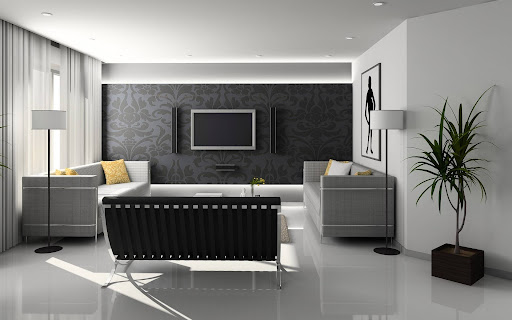
A television mounted on the wall saves floor space. It also removes the risk of tip-overs, creates a clean viewing angle, and transforms your living room into a professional media setup. In Singapore’s compact HDB flats, an LCD TV wall mount is often the only practical way to position a large screen without cluttering the room. But mounting a TV on a wall in a Singapore home requires more than a drill and some screws. You need to know HDB rules, wall construction methods, and the exact hardware that matches your TV. This article gives you the facts, the steps, and the safety checks for a proper LCD TV wall mount installation.
HDB Regulations for TV Wall Mounting: What You Cannot Do
The Housing & Development Board sets clear boundaries for any drilling work. You cannot drill into structural beams, columns, or reinforced concrete walls that form the building’s core framework. Damaging these elements compromises the entire block’s safety and you bear full liability. HDB also bans drilling on false ceilings, parapet walls, and external wall facades. For all drilling work, you must keep noise within permitted hours: weekdays 9am to 5pm, with no work on Saturdays, Sundays, or public holidays.
For newer BTO flats with Ferrolite or other lightweight concrete partitions, HDB imposes a maximum drill depth of 40mm. Exceeding this depth risks penetrating into common property or damaging embedded conduits. Always refer to your flat’s floor plan, available on the HDB website or MyNiceHome portal, to identify structural versus non‑structural walls before you plan any mounting project.
Wall Types in Singapore Homes: How Each Affects Your Mount
Concrete walls are the gold standard for holding heavy TVs. They appear in most HDB living rooms and bedrooms. Concrete provides excellent pull‑out strength, but drilling requires a hammer drill and masonry bits. Use expansion anchors or concrete screws rated for the TV’s weight.
Drywall partition walls (Severe Duty gypsum boards) are common in newer BTO flats, especially in bedrooms. HDB rates these walls to support up to 25kg per mounting point, but only when you use proper hollow‑wall anchors like toggle bolts. Never mount a TV directly into drywall without anchors. You must also avoid areas with concealed wiring.
Brick walls appear in older HDB flats (built before 1990). Brick provides decent holding power but can crack if you drill too aggressively. Use a masonry bit at low speed and insert wall plugs designed for brick. Do not over‑tighten screws, as brick crumbles under excessive torque.
Choosing the Right LCD TV Wall Mount for Your Screen
Not every mount works with every TV. You must match three specifications: VESA pattern, weight capacity, and mount type.
VESA (Video Electronics Standards Association) defines the hole pattern on the back of your TV. Common sizes include 200x200mm for 32‑inch TVs, 400x400mm for 55‑inch models, and 600x400mm for screens above 65 inches. Check your TV’s manual or measure the distance between the four mounting holes. Any LCD TV wall mount you buy must list a VESA range that includes your TV’s exact pattern. A mismatch means the bracket will not attach.
Weight capacity is non‑negotiable. A 55‑inch LCD TV typically weighs 15 to 20kg, while larger models can exceed 30kg. The LCD wall mount must have a rated capacity higher than your TV’s actual weight. Add 20% as a safety buffer. Do not use a mount rated for 25kg with a 24kg TV because that leaves no margin for movement or accidental pulling.
Mount types fall into three categories. Fixed mounts hold the TV flat against the wall, only a few centimetres from the surface. They offer the lowest profile but no angle adjustment. Tilting mounts allow you to angle the screen downward, which helps when you mount the TV above a console or at a higher position. Full‑motion (articulating) mounts pull out from the wall, swivel left and right, and tilt up and down. They give you the most flexibility but place higher stress on the wall and require the strongest anchors.
Essential Tools for Installing an LCD TV Wall Mount
Gather these tools before you start any drilling. Missing even one item can stop the job halfway.
You need a hammer drill for concrete or brick walls, or a standard power drill for drywall. Drill bits must match the wall material: carbide‑tipped masonry bits for concrete or brick, standard twist bits for drywall. A stud finder with AC wire detection is mandatory – it locates wall studs and alerts you to live wires or water pipes behind the wall. You also need a spirit level (at least 600mm long), a measuring tape, a pencil, wall plugs (anchors) appropriate for your wall type, and a socket wrench or screwdriver. Wear safety goggles and a dust mask. Drilling concrete generates fine silica dust that is hazardous to breathe.
Step‑by‑Step Guide To Installing an LCD TV Wall Mount
| Step | Details |
|---|---|
| Step 1: Choose the viewing position | Sit in your primary seating spot. The centre of the TV screen should align with your eye level when you look straight ahead. For most living rooms, this places the TV’s centre 42 to 48 inches from the floor. Avoid mounting opposite large windows because glare will make daytime viewing difficult. Keep the TV at least 150mm away from any heat source like a fireplace or radiator (uncommon in Singapore but relevant for some landed properties). |
| Step 2: Scan the wall for hazards | Turn on your stud finder with wire detection mode. Slowly scan the entire area where you plan to mount the TV. Mark any detected electrical cables, water pipes, or gas lines with pencil. If you find wiring directly in the centre of your chosen location, shift the mount left or right by at least 50mm. Drilling into a live wire causes a short circuit, possible fire, and expensive repair work to rewire the concealed cable. |
| Step 3: Locate wall studs (for drywall installations) | For drywall partitions, you must anchor the mount into at least two wall studs. Use the stud finder to mark the centre of each stud. Studs in HDB drywalls are typically spaced 400mm or 600mm apart. If the TV width does not allow both studs to align with the mount’s wall plate, you need a mounting plate that spans across multiple studs. Never rely on drywall anchors alone for a TV heavier than 15kg. |
| Step 4: Mark the drill points | Hold the wall plate of your LCD TV wall mount against the wall at the marked height. Use the spirit level to ensure the plate is perfectly horizontal. Mark each drill hole with a pencil through the plate’s openings. Double‑check the distance between marks against the mount’s specification sheet. |
| Step 5: Drill pilot holes | Set your drill to the correct mode. For concrete or brick, engage hammer mode and use a masonry bit one size smaller than the wall plug. Drill straight and steady, without wobbling. The hole depth should equal the length of the wall plug plus 5mm. For drywall, use standard twist mode and a bit that matches the anchor size. Drill only through the drywall, not into the cavity beyond. |
| Step 6: Insert wall anchors | Tap the wall plugs into the holes using a hammer. They should sit flush with the wall surface. For drywall toggle bolts, fold the spring wings and push them through the hole until the wings open behind the wall. Pull back gently to seat the wings against the inner surface. |
| Step 7: Attach the wall plate | Position the wall plate over the holes. Insert screws through the plate and drive them into the anchors. Tighten firmly but stop when the screw head contacts the plate because overtightening strips threads in concrete anchors or crushes drywall. Recheck the plate with your spirit level. |
| Step 8: Prepare the TV | Lay the TV face‑down on a soft blanket or foam mat on a flat surface. Locate the four VESA mounting holes. Attach the mounting brackets or vertical rails to the TV using the screws provided in your LCD wall mount kit. Use the correct screw length: screws that are too long damage internal circuits, while screws that are too short pull out under the TV’s weight. Most kits include spacers, so use them if the TV has a curved back or recessed holes. |
| Step 9: Hang the TV | Get a second person to help lift the TV. Engage the brackets onto the wall plate. Most mounts use a hook‑and‑latch system. Push the TV downward until you hear a click or feel the lock engage. Insert any safety screws or locking pins that came with the mount. These prevent the TV from being accidentally lifted off the wall. |
| Step 10: Adjust and cable manage | Tilt or swivel the TV to your preferred viewing angle. Tighten all adjustment screws. Connect your power cord and HDMI cables. Run cables along the wall using adhesive cable clips or a plastic raceway. If you want a completely hidden look, consider an in‑wall cable management kit but note that HDB requires a licensed electrician for any in‑wall wiring work. |
Need help mounting your TV safely? FixFirst’s certified handymen install TVs across all HDB flats and condos in Singapore. We handle wire detection, proper stud alignment, and full safety testing—so your setup is secure, level, and clutter-free. Book now for a professional installation that enhances your entertainment experience!
Common Mistakes That Cause TV Falls
Many DIY installations fail because of easily avoidable errors. Using the wrong anchors tops the list. Standard plastic wall plugs from a hardware shop cannot support a 20kg TV. You need heavy‑duty anchors rated for the specific wall type and weight. For concrete, use sleeve anchors or lag shields. For drywall, use toggle bolts or metal snap toggles.
Ignoring VESA compatibility is another frequent mistake. An LCD TV wall mount designed for 400x400mm will not fit a TV with a 200x200mm pattern. Do not drill new holes in the TV chassis – this voids the warranty and creates dangerous stress points. Instead, buy a mount with an adjustable VESA plate or a universal adapter.
Mounting on drywall without locating studs is a guaranteed failure. Drywall alone has a shear strength of only about 10kg per anchor, and dynamic forces from pulling or tilting the TV multiply the load. Always anchor into studs. If your TV position does not align with studs, install a plywood backing panel across multiple studs, then mount the TV to the panel.
Over‑tightening screws cracks drywall and strips concrete anchors. Stop tightening when the screw feels snug. If you hear cracking sounds from drywall, you have gone too far – back out the screw and use a larger anchor.
Professional Installation vs DIY: A Risk Assessment
You can install an LCD TV wall mount yourself if you have the right tools, a thorough understanding of your wall type, and the patience to follow every safety step. But the risks in a Singapore HDB flat are real. Hidden electrical wiring is the most common danger. HDB flats have power and data cables running horizontally at specific heights typically 300mm from the ceiling for lighting circuits and 450mm from the floor for power outlets. A wire detector only works if you scan the entire area thoroughly. Professionals use calibrated detectors and cross‑reference with HDB’s concealed wiring maps.
The second risk is structural damage. Drilling too deep into a Ferrolite wall can breach the other side, damaging common property. Drilling into a beam triggers mandatory repair at your cost, plus potential fines. Professional handymen from FixFirst carry HDB‑compliant drill depth stops and know exactly which walls are safe to drill.
The third risk is the TV falling. A falling 55‑inch TV can injure a child or pet, destroy furniture, and write off the TV itself. Professional installation includes load testing, torque verification, and periodic inspection reminders.
Conclusion
An LCD TV wall mount delivers a cleaner, safer, and more enjoyable viewing experience in any Singapore home. Success depends on three things: following HDB rules, matching the mount to your TV’s VESA pattern and weight, and using the correct anchors for your wall type. The step‑by‑step method above works, but only if you execute every step with care.
FixFirst provides TV mounting services across all HDB towns and private estates in Singapore. Do not guess with your TV or your family’s safety. Book your LCD TV wall mount installation with FixFirst today.