Your smart television deserves more than a bulky console that eats up floor space. A wall mount smart TV installation transforms your living room from crowded to calm, freeing up valuable square footage and creating a clean, modern aesthetic. The screen floats against the wall, becoming an integrated part of your home rather than a piece of furniture you must walk around. Beyond the spatial gains, TV wall mounting gives you ergonomic control over your viewing experience. You can position the screen at the optimal height to align with your seated eye level, reducing neck strain during long movie marathons. You can also tilt the screen to combat glare from Singapore’s abundant natural light.

Understanding HDB Regulations Before You Drill
Before you purchase any bracket or pick up a drill, you must understand the Housing and Development Board’s renovation guidelines. These rules protect the structural integrity of your building and ensure safety for all residents. The HDB explicitly prohibits drilling into structural elements such as reinforced concrete walls, columns, beams, and slabs. Compromising these components is illegal and endangers the building’s core framework.
For permissible wall surfaces, HDB regulations specify that all fasteners like screws, nails, or bolts must not exceed 6 mm in diameter and 40 mm in penetration depth for all flat types. This rule prevents damage to concealed electrical wiring and water pipes. For newer flats with Ferrolite partition walls, even stricter limits apply, with penetration depth restricted to about 22 mm.
Noisy work, including drilling, is permitted only on weekdays between 9:00 am and 5:00 pm, with no drilling allowed on Saturdays, Sundays, or public holidays. Ignoring these rules can result in fines, forced removal of fixtures, or complications when selling your flat.
Knowing Your Wall Type
HDB walls fall into three main categories, and identifying your wall type is your most critical first step. Concrete load-bearing walls form the building’s structural frame. You may drill small holes into these walls for mounting fixtures, but you cannot hack, cut, or significantly alter them. Concrete walls hold a television effortlessly with M8 expanding anchor bolts. Solid concrete delivers a dead, heavy thud when you knock on it.
Dry partition walls are non-structural and common in newer flats. Drilling into these is permissible, but you must use appropriate hardware designed for hollow walls or anchor directly into the metal or wood studs behind the plasterboard. Hollow partitions ring with a slight echo when you knock on them. For these walls, use specialist toggle bolts that spread behind the board, never standard plastic wall plugs.
Brick walls appear in older HDB estates. Drilling into brick is allowed but requires a hammer drill and masonry bits to penetrate without causing cracks.
Before you drill, use a professional stud finder with AC detection to locate wall studs and identify any concealed electrical wiring or water pipes. In HDB flats, wiring typically runs vertically or horizontally from existing sockets and switches. As a general rule, avoid drilling directly above, below, or beside any electrical point.
Choosing the Right Wall Mount for Your Smart TV
Selecting the correct bracket is the foundation of a secure and satisfying setup. Your choice must align with your specific television model, its size and weight, and the viewing flexibility you desire.
The process starts with two technical specifications: your TV’s VESA pattern and its weight. The VESA pattern refers to the distance between the four mounting holes on the back of your television, measured in millimetres horizontally and vertically. Common patterns include 75×75 mm, 100×100 mm, 200×200 mm, and 400×400 mm. You can find your TV’s VESA pattern listed in the user manual or by measuring the distance between the mounting holes directly. If your bracket’s VESA pattern does not match your TV’s, the mount will not fit.
Your bracket’s weight rating must exceed your TV’s mass by a comfortable margin. TV brackets come with specified weight limits, and you should never exceed them, as this directly impacts safety. Many budget brackets corrode in Singapore’s humidity; look for a baked-on powder coat and stainless steel hardware that stay clean for years.
Fixed Wall Mounts
A fixed mount keeps the television hugging the wall without any movement. This option is ideal when your sofa faces the screen square on and you value a flush, minimalist profile.
Tilting Wall Mounts
A tilting mount angles the screen downward to cancel reflections from windows and ceiling lights. This matters a lot in HDB living rooms where the TV must sit above an existing console or just under a beam. Tilt mounts typically offer five to ten degrees of vertical adjustment.
Full-Motion Wall Mounts
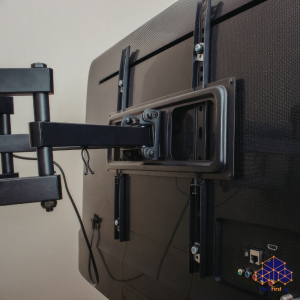
A full-motion articulating arm pulls the screen out and swivels it toward different viewing areas. This bracket type offers the most flexibility, allowing you to tilt, swivel, and extend the TV for optimal viewing from multiple spots in the room. Full-motion mounts are a practical luxury in open-plan flats where you watch from more than one seating position.
Setting the Correct Viewing Height
The centre of the screen should hit your seated eye line, which in most HDB living rooms lands around 1,000 to 1,100 millimetres above the finished floor. Tape a paper template of the TV to the wall, sit in your usual seat, and check if your gaze falls naturally into the middle of the template. This quick mock-up prevents the all-too-common error of mounting the bracket so high that everyone tilts their neck backward to watch. If a low console forces the screen a touch higher, a tilt bracket reclaims the angle and keeps the picture crisp even when you sink into the sofa.
Concealing Cables the Right Way
A wall mount smart TV installation looks incomplete when surrounded by dangling wires. Surface trunking, painted to match your wall colour, routes power and HDMI leads neatly and complies fully with HDB regulations. These plastic or PVC channels attach directly to your wall surface, creating a dedicated pathway for cables from your TV down to the power outlet and media units. The HDB explicitly prohibits cutting or chasing into walls, which includes creating deep channels for cables. Surface trunking provides the most accessible and HDB-friendly approach to cable management.
Common Installation Mistakes To Avoid
One frequent error involves using screws that are too long. Screws exceeding HDB’s 40 mm depth limit can penetrate concealed pipes or wiring, causing expensive damage.
Another mistake involves mounting the bracket without locating wall studs first. Screwing into hollow wall sections without proper anchors invites disaster since the weight of your television can pull the mount from the wall. For hollow partition walls, you must use heavy-duty toggle bolts that can spread the load across a wide area behind the wall surface. Standard plastic plugs are utterly insufficient for the dynamic load of a heavy television and will inevitably fail over time.
Using undersized anchors ranks as another primary cause of installation failure. The rated capacity of a bracket refers to what the bracket itself can carry under ideal conditions. That number means nothing if the wall cannot match it. Always match your hardware to both your wall type and the weight of your television.
A third mistake involves poor cable management. A professionally installed wall mount smart TV is undermined by a tangled mess of dangling wires. Plan your cable routing before you drill any holes.
Professional Installation vs DIY
Installing a wall mount smart TV appears straightforward, but the installation demands precision. Misaligned brackets lead to crooked televisions. Improper anchoring creates a safety hazard. Incorrect drilling violates HDB rules and risks expensive damage to concealed wiring and plumbing.
FixFirst’s handymen are experienced in installing wall mount smart TV systems across Singapore HDB flats. They understand which wall plugs work best for concrete, brick, and drywall. They know how to locate studs accurately and identify false walls. They ensure every bracket sits level and secure. They also handle the drilling within HDB’s permitted hours, so you avoid noise complaints from your neighbours.
Contact FixFirst today for expert installation services across Singapore. Our handymen handle the entire process so you get a safe, professional result every time.