Not every living room allows a television to sit tight against the wall. Built-in carpentry, a deep console, or a corner placement that demands an angled view often calls for extra distance between the bracket’s wall plate and the back of the screen. A TV wall mount extension bracket provides that distance. It sounds simple—a steel arm bolted between the existing mount and the wall—but the extra reach changes the entire equation of weight and anchor stress. Singaporean homeowners who treat this as just another accessory risk watching their screen tilt forward or pull its anchors loose over time.

When a Standard Mount Cannot Do the Job
HDB living rooms contain design quirks that can surprise anyone. A false ceiling cove might dip low and block a flush-mounted screen from tilting upward. A bay window ledge may jut out just enough to crowd the television’s path when a full-motion arm retracts. Even a fixture as common as a soundbar sitting on a console can force you to mount the television several inches above the bracket’s natural contact point, reducing stability. In each of these scenarios, a TV wall mount extension bracket bridges the gap. Fixed extension arms add a few centimeters of depth for cable access, while adjustable telescoping arms let you pull the screen out and angle it toward the dining table or kitchen pass-through. The right bracket delivers the spatial flexibility you could not get from a simple mounting plate.
What Separates a Good Extension Bracket from a Risky One
An extension bracket shifts the television’s centre of mass forward. The outward pull on the top anchors increases fast. A television that weighs 20 kg and sits 40 cm from the wall exerts far more rotational force than the same set mounted at a 3 cm depth. Good manufacturers understand this and rate their extension arms conservatively. They use thick gauge steel, welded or solid gusset plates at the stress points, and fine-thread bolts with nylon locking nuts that resist vibration.
Cheap extension brackets cut corners. They flex under load, lean forward over time, and eventually crack. When you search for a TV wall mount extension bracket in Singapore’s online hardware stores or a Sim Lim Tower shop, look for a listed maximum weight capacity and cross-check that number against your television’s actual weight with any soundbar attached. A sensible safety margin means choosing a bracket rated for at least twice the total load after you account for the arm’s full extension. If the bracket does not publish a derating curve for different extension lengths, treat it with suspicion and ask the seller for the technical sheet.
Matching an Extension Bracket to Your Wall Type
Singapore walls punish poor anchoring decisions. Concrete and brick walls in most HDB units can handle an extended mount if you use M8 or M10 sleeve anchors embedded to the correct depth. The deeper the embedment, the less chance the anchor cone fractures the concrete under repeated pull-out force. For hollow concrete block walls, toggle bolts or heavy-duty sleeve anchors designed for hollow substrates stop the fasteners from spinning out. Drywall partitions, common in newer study rooms or loft-style flats, rarely cope with a TV wall mount extension bracket unless you bolt through the plasterboard into metal studs. Even then, maximum extension must stay short, and the arm should carry a modest screen below 23 kg. If you must mount an extended bracket on drywall, a plywood backer board spanning two studs distributes the load and prevents the gypsum board from crumbling under the leverage.
Step-by-Step: Installing a TV Wall Mount Extension Bracket Correctly
- Determine your total stack weight. Add the television, any soundbar attached to the mount, the extension arm, and the original bracket head. Write this figure down and compare it with the extension bracket’s maximum load rating at the distance you intend to extend.
- Check the bolt pattern. The extension arm’s wall-side plate must match the hole pattern on your existing wall plate, while the TV-side plate must mate with your current mount’s VESA head. If a mismatch exists, you need a universal adapter plate, but stacking multiple adapters increases the moment arm and reduces overall capacity further.
- Prepare the wall. Identify the substrate and mark positions. For concrete, use a hammer drill with a depth stop to avoid over-drilling. Clean the holes of dust before inserting sleeve anchors because concrete dust acts as a lubricant that can cut anchor grip by half.
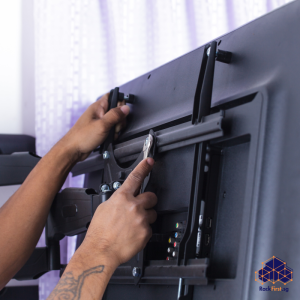
- Bolt the extension bracket’s wall plate to the wall anchors. Apply firm but even torque. Use flat washers and spring washers in that order—flat washer against the plate, spring washer under the nut—to prevent loosening from daily vibration caused by opening and closing the arm.
- Attach the original mount head to the extension bracket’s TV plate. Tighten all bolts while the arm rests at its shortest position. Extend the arm only after everything is locked, and check for smooth movement without binding.
- Hang the television and engage the safety locking screws. Extend and retract the arm a few times while watching the wall anchors for any movement. A hairline crack in the wall surface around the anchor or a tiny puff of plaster dust means the anchor is shifting and needs immediate attention.
Cable Management When the TV Sits Far from the Wall
An extended mount leaves a cavity behind the screen that many homeowners want to use for power strips or media boxes. Placing a socket strip on the wall and plugging the television’s flex into it looks messy and violates Singapore’s fixed wiring guidelines if permanent cords run inside the wall. The cleaner way is to have a licensed electrician install a recessed 15A outlet directly behind where the screen sits when retracted, with a brush plate for HDMI cables. The extra depth an extension bracket provides makes this recessed installation easier because the back box can sit flush inside the wall without pushing the television forward. FixFirst handles this in one session, running the new circuit through surface conduit inside a drywall cavity or chasing a shallow channel in masonry, all while respecting HDB compliance rules.
A Hold That Lasts
An extension arm transforms how you watch television in a tricky room, but only when the anchors hold and the bracket stays true. Every millimeter you push the screen away from the wall demands more from the bolts sunk into your concrete or brick. Choose a TV wall mount extension bracket built with enough steel to withstand the strain, match it to your wall type, and never treat drywall as solid. The finished install should feel immovable even with the arm at full stretch, leaving you free to angle the screen exactly where the sofa sits. If you prefer that a trained handyman checks the wall, picks the right extension bracket, and handles the wiring while keeping your home dust-free, call FixFirst or book online. We mount, extend, and connect your television so the only thing that moves is the picture.