The pursuit of perfect Wi-Fi coverage in a Singapore HDB often leads homeowners to an elegant solution: the Google Wi-Fi or Nest Wi-Fi mesh system. These discreet nodes work together to blanket your home in a consistent, strong signal. However, their modern design, intended for open spaces, often conflicts with the reality of limited surface area in our compact flats. Placing a node on a crowded shelf or the floor can stifle its performance and consume precious space. This is where a strategic Google Wi-Fi wall mount becomes a transformative upgrade. Elevating your node unlocks its full potential, and this guide provides a comprehensive roadmap for Singapore residents to achieve a superior home network through proper mounting.

The Unseen Benefits of Wall-Mounting Your Google Wi-Fi System
Google’s mesh nodes create a unified network by communicating with each other. Any physical obstruction—thick concrete walls, large metal appliances, or even dense furniture—can weaken the connection between them. The primary advantage of a Google Wi-Fi wall mount bracket lies in the elevation and liberation of the node. Positioning it high on a wall places the device above many common household barriers, granting its radio waves a clearer path to other nodes and your connected devices. This simple act of repositioning can mean the difference between a buffering video call and a crystal-clear connection. For HDB layouts, a central hallway or a high placement in a common room acts as a powerful broadcast point, ensuring strong coverage reaches every bedroom and kitchen corner, truly achieving the best google Wi-Fi wall mount outcome for whole-home coverage.
Selecting the Right Wall Mount for Your Google Ecosystem
The market offers a variety of mounting solutions tailored to different Google products. Understanding the distinctions ensures you select a mount that complements your device and your home’s aesthetics.
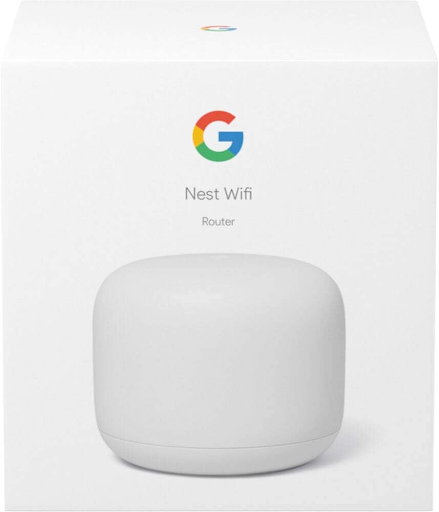
The most common type is a dedicated Google Nest Wi-Fi wall mount. These third-party accessories typically cradle the node snugly against the wall, preserving its sleek profile. A search for Google Wi-Fi wall mount Singapore will reveal numerous options from local and international sellers. For the hands-on individual, a Google Wi-Fi wall mount DIY project might seem appealing, though a pre-made bracket offers greater reliability and a polished finish.
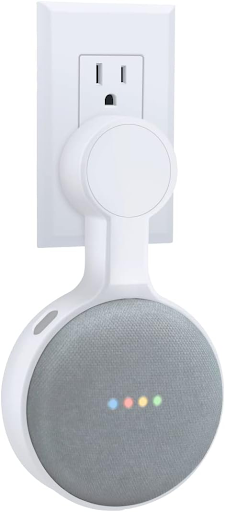
The ecosystem extends far beyond the primary Wi-Fi points. A Google Home Mini wall mount is exceptionally popular due to the device’s small size, allowing for installation in kitchens, hallways, or bedrooms without using any surface space. Similarly, you can find a Google Home Hub wall mount for smart displays, and even a substantial Google Home Max wall mount for the larger speaker, which demands a sturdy bracket due to its weight. For the newer generation, a Google Nest Mini wall mount serves the same purpose, often clicking directly into the built-in wall mount slot on the device itself. The broader category of a Google Home wall mount encompasses all these devices, but specificity is key to a perfect fit.
The following table summarizes the primary mount types for Google’s product line:
| Mount Type | Description | Best For |
|---|---|---|
| Google Wi-Fi/Nest Wi-Fi Wall Mount | A bracket, often a sleeve or cradle, that holds the mesh node securely against a wall. | Owners of Google Wi-Fi or Nest Wi-Fi points looking to improve signal range and save space. |
| Google Home Mini/Nest Mini Wall Mount | A small bracket, often with a built-in power cable clip, that screws into the device’s base or holds it via a custom sleeve. | Mounting the compact speaker in any room without a power outlet shelf. Ideal for a wall mount google home mini setup. |
| Google Home Hub Wall Mount | A bracket designed to hold the smart display, often with adjustable tilt for optimal viewing angles. | Installing the display at eye level in a kitchen for recipes or as a smart control panel in a living area. |
| Google Home Max Wall Mount | A heavy-duty bracket engineered to support the significant weight of the larger Google Home Max speaker. | Securely mounting the premium speaker for immersive sound in a living room without floor or shelf clutter. |
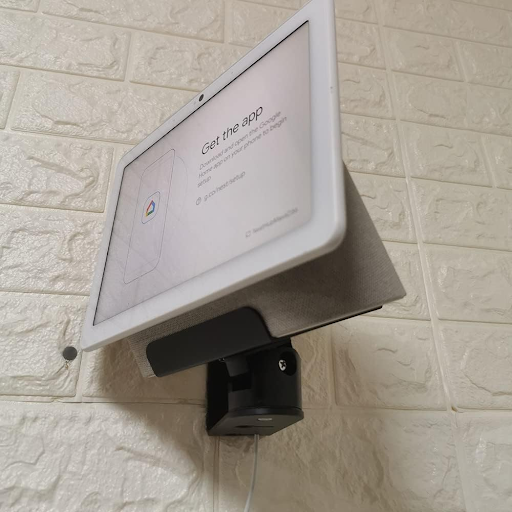
Mounting the Broader Google Home and Nest Family
The diversity of the Google Home line means a one-size-fits-all approach does not work. Each device has a distinct form and function, which directly influences its ideal mounting solution.
The Google Home Mini wall mount and its successor, the Google Nest Mini wall mount, are among the most common accessories. Many mounts use the threaded socket built into the device’s base, enabling a clean and secure installation that makes the device appear flush with the wall. When you undertake a DIY Google Home Mini wall mount project, the central challenge often involves hiding the power cable for a wireless aesthetic, which requires precise drilling and clever cable routing. For those seeking a ready-made solution, a search to buy google home mini wall mount in Singapore will yield many options. Identifying the best Google Home Mini wall mount often comes down to the quality of materials and the effectiveness of its integrated cable management system. Similarly, finding the best Google Mini wall mount for a Nest Mini follows the same principles, focusing on a secure click-in fit.
For whole-home mesh coverage, implementing a Google Mesh wall mount strategy might involve mounting multiple nodes. The objective is to position each unit for the best possible “line of sight” to the others, minimizing the number of walls the signal must penetrate. This strategic approach makes high wall placements in central corridors or open common areas incredibly effective. While the physical mounting of a node is straightforward, the planning of their placement demands a thoughtful analysis of your HDB”s unique layout to create a truly robust network.
Strategic Positioning and HDB Installation Considerations
Choosing the right location for your mounted Google device is a decision with lasting impact on both performance and safety. For Wi-Fi nodes, central locations within your HDB’s floor plan are ideal. A high placement on an interior wall in a hallway or the living room often provides the most balanced coverage. Avoid tucking the device behind a television or inside a cabinet, as this will dramatically reduce its range. Keep nodes away from large metal objects and direct sources of heat.
Structural integrity is a critical factor in Singaporean flats. HDB walls, typically made of reinforced concrete, require the correct tools and heavy-duty wall anchors for a secure installation. Using inadequate plugs or screws can result in a loose mount and a fallen, damaged device. Furthermore, HDB renovation guidelines stipulate that homeowners must avoid damaging concealed plumbing and electrical lines. Drilling into a wall without knowing what lies behind it carries a real risk of hitting water pipes or wires, leading to significant repair costs and potential compliance issues. A professional assessment mitigates this risk entirely.
A Step-by-Step Guide to Mounting Your Google Wi-Fi Point
For the confident DIYer, following a meticulous process is key to a safe and successful installation.
| Step | Details |
|---|---|
| Step 1: Plan the Location and Gather Tools | Identify the optimal spot for coverage, ensuring it is near a power outlet. You will need a drill, a masonry drill bit, a screwdriver, a spirit level, a stud finder, a pencil, and your google Wi-Fi wall mount bracket with its screws and wall plugs. |
| Step 2: Mark the Drilling Points | Use the stud finder to check for studs or clear a spot for anchors. Hold the bracket against the wall, use the spirit level to ensure it is perfectly straight, and mark the screw holes with a pencil. |
| Step 3: Drill the Pilot Holes | Using the appropriate masonry bit, carefully drill holes at the marked points. Match the drill bit size to your wall plugs and drill to the required depth. |
| Step 4: Insert the Wall Plugs | Tap the plastic wall plugs into the drilled holes gently until they are flush with the wall surface. |
| Step 5: Secure the Bracket to the Wall | Align the bracket with the holes and drive the screws through the bracket into the wall plugs. Tighten the screws until the bracket is firmly fixed and does not move. |
| Step 6: Attach the Google Device | For a Google Nest Wi-Fi wall mount, this usually involves sliding the node into the cradle. For a Google Nest mini wall mount, you will typically screw the device directly onto the bracket or snap it into place. |
| Step 7: Manage Cables and Power On | Route the power cable neatly along the wall, using adhesive clips or a cable raceway to secure it. Plug in the device and confirm it powers on and connects to your mesh network. |
Need a secure, damage-free wall-mounted Google device installation in your HDB flat? FixFirst’s certified handymen use professional tools and HDB-compliant techniques to ensure your mount is level, stable, and safe
Why Choose a FixFirst Handyman To Install Your Google Wi-Fi Wall Mount
Entrusting the installation of your Google Wi-Fi wall mount bracket to a FixFirst professional eliminates the uncertainties and risks of a DIY approach. Our expertise delivers a result that is not only functional but also durable and perfectly integrated into your home.
✔️ Strategic Placement for Maximum Coverage: Our technicians understand Wi-Fi signal propagation. We advise on the ideal location to strengthen your mesh network, ensuring your Google Mesh wall mount strategy delivers the strongest possible signal across your entire HDB.
✔️ Safe and Damage-Free Drilling: We expertly navigate your HDB’s walls, avoiding electrical wiring and concealed plumbing as per HDB guidelines, to install your bracket with absolute security and peace of mind.
✔️ Professional-Grade Fixtures and Tools: We use high-quality wall anchors and drills designed for concrete walls, guaranteeing that your valuable Google device remains safely mounted.
✔️ Expert Cable Concealment: We manage all cables with a focus on cleanliness and safety, routing and concealing them to achieve a professional, clutter-free finish that enhances your room’s appearance.
✔️ Time and Hassle Savings: We complete the job correctly on the first visit, saving you the expense of buying specialized tools and the frustration of potential installation errors or wall damage.

Frequently Asked Questions (FAQs) about Google Wi-Fi Wall Mounts in Singapore Homes
It can significantly improve perceived speed and reliability by enhancing the signal strength between nodes. A stronger connection reduces latency and packet loss, leading to smoother streaming, faster downloads, and more stable video calls throughout your home.
Central, elevated locations are most effective. A high spot on an interior wall in a hallway, the living room, or a common area that provides a relatively clear path to other nodes in your home is ideal.
Google does not manufacture an official wall mount for its Wi-Fi nodes. The market consists of high-quality third-party brackets designed specifically for these devices, and finding the best google Wi-Fi wall mount involves checking reviews and product specifications.
Look for mounts that use the device’s built-in threaded socket for security and include a solution for managing the power cable. Reading reviews to find the best google home mini wall mount often highlights models with superior build quality and design.
While possible for very light devices on perfectly smooth surfaces, drilling is always recommended for a permanent and secure installation. Adhesives can fail over time, especially in humid environments, risking damage to your device.
The nodes have different shapes and sizes. A Google Wi-Fi wall mount bracket is designed for the cylindrical first-generation puck, while a Google Nest Wi-Fi wall mount is shaped for the larger, rounded second-generation node. Always verify compatibility before purchasing.
Mounting it on a wall should not degrade performance and may even improve sound projection. Ensure the mount does not cover the device’s microphone ports or speaker grilles.
It is not recommended due to the high humidity and moisture levels, which can damage electronics over time. If it is the only viable location, choose a spot far from the shower and ensure the room is extremely well-ventilated.
A strategically placed Google Wi-Fi wall mount is a critical component for achieving the whole-home coverage that mesh systems promise. By intelligently positioning your nodes and smart speakers on the wall, you elevate them above obstructions, declutter your living spaces, and create a more powerful and responsive smart home environment. While the DIY route is an option, the precision, safety, and guaranteed quality of a professional installation protect your investment and deliver optimal performance from day one.
Do not let poor placement limit your network. Contact FixFirst now to schedule your professional Google device wall mounting service and experience the full strength and convenience of a perfectly installed smart home system.