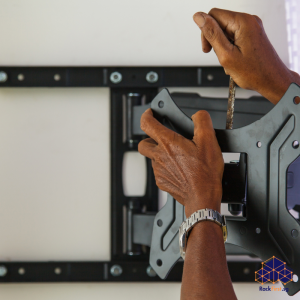
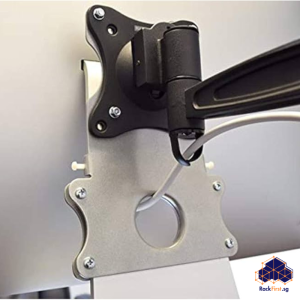
Your desk holds your monitor, keyboard, mouse, and maybe a laptop dock. Adding a pair of PC speakers to that crowded surface often forces you to compromise on placement or deal with a cluttered workspace. Wall mounted PC speakers offer a direct solution. Moving your speakers off the desk and onto the wall frees up valuable surface area, creates a cleaner aesthetic, and positions the audio drivers at an optimal listening height.
Wall mounted PC speakers also protect your equipment from accidental knocks, spills, or curious pets. The elevated position directs sound more effectively into your listening space rather than letting it disperse into furniture or get blocked by your monitor. Whether you work from home, game competitively, or simply enjoy music while you browse, mounting your speakers on the wall delivers both practical and acoustic benefits.

Understanding Your Speaker Mounting Options
Not every pair of PC speakers can hang directly on a wall. Most consumer desktop speakers lack built-in mounting holes or keyhole slots. You have three main paths to achieve wall mounted PC speakers with your existing setup.
- The first option involves universal speaker wall mount brackets. These brackets clamp around the sides of your speakers or provide a shelf-like platform that holds the unit securely. Products like the WALI Dual Side Clamping Bookshelf Speaker Wall Mounting Bracket fit speakers with widths ranging from 5.5 to 11 inches and support up to 55 lbs. Smaller brackets rated for 7.7 lbs work well for compact PC speakers. These universal mounts often include tilt and swivel adjustments, allowing you to angle the speakers directly toward your listening position.
- The second option applies to speakers with built-in keyhole slots on the back. Many bookshelf and surround sound speakers include this mounting system. The keyhole consists of a wide circular opening that narrows into a thinner channel. You screw wall anchors into the wall, then slide the speaker down so the screw heads lock into the narrow portion of the slot. This method leaves the mounting hardware hidden from view once you hang the speaker.
- The third option involves VESA-compatible speakers. Some PC speakers attach directly to monitor mounts using the VESA 75×75 mm or 100×100 mm patterns. These setups clamp the speakers to the sides of your monitor, keeping everything within arm’s reach without drilling extra holes in your wall.
HDB Regulations You Must Follow
Before you drill any holes for wall mounted PC speakers, understand the Housing and Development Board’s rules. HDB prohibits drilling into structural elements such as reinforced concrete walls, columns, beams, and slabs. These structural components support the building, and compromising them violates HDB regulations and poses a serious safety risk.
For permissible wall surfaces, all fasteners like screws, nails, or bolts must not exceed 6 mm in diameter and 40 mm in penetration depth for all HDB flat types. This rule prevents damage to concealed electrical wiring and water pipes. For newer flats with Ferrolite partition walls, drilling must avoid a 200 mm strip below ceilings and beams, and penetration should stay around 22 mm.
Noisy work, including drilling, is restricted to weekdays between 9:00 am and 5:00 pm and is prohibited on Saturdays, Sundays, and public holidays.
Choosing the Correct Wall Anchors
The integrity of your wall mounted PC speakers depends entirely on the hardware you select. A simple plastic anchor will not suffice for speakers weighing more than a few hundred grams. For concrete walls, you need concrete anchor bolts such as sleeve anchors or wedge anchors that expand inside the concrete to create a powerful grip. For brick walls, sleeve anchors rated for masonry work effectively. For drywall or plasterboard partitions, you must locate the metal studs behind the board and drive your mounting screws into those studs, or install a plywood backing plate that spans multiple studs and distributes the load.
Installation Steps for a Secure Mount
- Start by assessing your chosen wall. Use a professional stud finder with AC detection to locate the vertical studs and identify any concealed electrical wiring or water pipes. Mark the desired position of your wall mounted PC speakers on the wall. Use a spirit level to ensure your marks sit straight.
- Drill pilot holes at the marked positions, staying within HDB’s 6 mm diameter and 40 mm depth limits. Insert the appropriate wall anchors for your wall type. Attach the speaker brackets or mounts to the wall using the included hardware. Ensure the brackets sit level and flush against the wall without bending.
- Attach your speakers to the brackets according to the manufacturer’s instructions. For clamp-style brackets, tighten the clamps securely without over-tightening. For keyhole mounts, slide the speaker down until it locks into place. Adjust the tilt and swivel angles to point the speakers directly at your ears when seated.
Common Mistakes To Avoid
One frequent error involves using screws that are too long. Screws exceeding HDB’s 40 mm depth limit can penetrate concealed pipes or wiring, causing expensive damage. Another mistake involves mounting speakers without locating wall studs first. Screwing into hollow wall sections without proper anchors invites disaster because the weight of your speakers can pull the mount from the wall.
Using undersized anchors ranks as a primary cause of installation failure. The rated capacity of a bracket refers to what the bracket itself can carry under ideal conditions. That number means nothing if the wall cannot match it. Always match your hardware to both your wall type and the weight of your speakers.
A third mistake involves poor speaker positioning. Desktop speakers are meant for listening at a distance of around 0.5 to 1 metre. Mounting them too far from your listening position diminishes sound quality. Position the speakers at ear level when seated, typically with tweeters aligned with your ears, to create a detailed and coherent soundstage.
Professional Installation vs DIY
Wall mounted PC speakers appear straightforward, but the installation demands precision. Misaligned brackets lead to crooked speakers. Improper anchoring creates a safety hazard. Incorrect drilling violates HDB rules and risks expensive damage to concealed wiring and plumbing.
FixFirst’s handymen bring experience installing wall mounted PC speakers across Singapore HDB flats. They understand which wall plugs work best for concrete, brick, and drywall. They know how to locate studs accurately and identify false walls. They ensure every bracket sits level and secure. They also handle the drilling within HDB’s permitted hours, so you avoid noise complaints from your neighbours.
Final Thoughts
Wall mounted PC speakers transform your workspace by freeing up desk space and improving audio clarity. The elevated position directs sound more effectively into your listening space while protecting your equipment from accidental damage. Before you buy brackets, confirm your speakers’ weight and mounting compatibility. Before you drill, check your wall type and select appropriate anchors within HDB’s dimensions.
Ready to install your wall mounted PC speakers? Contact FixFirst today for expert installation services across Singapore. Our handymen handle the entire process from wall assessment to final alignment.