The evolution of personal photography from printed albums to cloud storage has created a new challenge: how do we enjoy our thousands of digital memories in our daily lives? For Singaporean homeowners, the answer lies not on a tabletop but on the wall. A wall mounted digital photo frame transforms a static display into a dynamic, ever-changing gallery of life’s moments. This sophisticated approach to home decor merges technology with sentimentality, but integrating it seamlessly into an HDB flat requires careful consideration of selection, power management, and secure installation. This guide provides a comprehensive roadmap for bringing this modern art form into your home.

Why Digital Frames Belong on Your Wall
The primary appeal of a wall mount digital picture frame is its ability to tell a continuous story. Unlike a single static image, it cycles through a curated collection of photographs, bringing walls to life with moving memories, animated sequences, and even video clips. This solves the common dilemma of choosing just one picture from a hundred great ones. For the space-conscious Singaporean home, it eliminates the need for multiple physical frames, creating a focal point that is both minimalist and rich with personal history. It represents a shift from decoration to experience, a living archive that celebrates family, travel, and milestones in a constant, gentle loop.
Key Considerations for Singaporeans
between technological specifications and domestic harmony. The first and most critical decision is between models that require a direct power connection and those that can operate on battery power, even if only temporarily. A hardwired large wall mounted digital photo frame offers a permanent, sleek look with no worries about battery life but necessitates clever cable management to avoid unsightly wires snaking down your wall.
Screen quality is paramount. Look for a high-resolution display with matte or anti-glare coatings to combat the strong Singaporean sun that streams through windows, preventing washed-out images. Brightness adjustment, either manual or automatic, is essential for ensuring clear visibility throughout the day and night without causing a disturbance in a dimly lit room. Consider the frame’s operating system and connectivity; Wi-Fi enabled frames allow for effortless uploading of new photos from your phone, no matter where you are, ensuring your wall display is always current.
Finally, the physical design of the frame itself matters. Many modern designs mimic the look of a traditional picture frame with a bezel, helping the technology blend into your home’s aesthetic rather than appearing as a monitor bolted to the wall. The goal is for the technology to recede, allowing the memories it displays to take center stage.
Types of Wall-Mounted Digital Frames and Their Ideal Placement
| Frame Type | Key Characteristics | Best Use Cases | Considerations for Singapore Homes |
|---|---|---|---|
| Hardwired Frames | Requires constant connection to a power outlet. Offers largest sizes and brightest displays. | Living room feature wall, above a console where cables can be hidden. Best for a permanent, high-impact display. | Requires professional cable concealment within walls (subject to HDB rules) or use of cable raceways. |
| Battery-Powered Frames | Cordless and portable. Offers maximum placement flexibility. | Bedroom walls, partitions, or areas far from power sources. Easily moved for seasonal redecoration. | Requires regular charging. Typically smaller in size. Less suitable for a large wall mounted digital photo frame setup. |
| Wi-Fi Enabled Frames | Connects to home network for cloud photo sync and updates. | Any room with strong Wi-Fi signal. Perfect for families who want to instantly send new photos to the frame. | Dependent on network stability. Security-conscious users should check data encryption standards. |
| Multi-Panel Displays | Several frames linked together to create a large, coordinated gallery wall. | Large empty walls in living areas or hallways. Creates a dramatic, modern art installation effect. | Complex setup and synchronization. Installation requires precise alignment for a cohesive look. |
The Art of Positioning and Power Planning
Positioning a dynamic frame shares some principles with its static counterparts—eye level is still important—but introduces a new variable: the power source. The most successful installations are those where the technology becomes invisible. This means planning the frame’s location in relation to the nearest power outlet. The ideal scenario involves mounting the frame directly above or beside an outlet to minimize visible cable length. For a truly clean look, one might consider having a new power outlet installed directly behind the planned frame location, a task that requires a licensed electrician and must comply with HDB regulations.
Ambient light plays a more significant role than with traditional art. Avoid placing the screen directly opposite a window where glare will dominate the image. Instead, choose a wall with indirect, soft light. The viewing angle is also crucial; ensure the screen is mounted straight-on to the primary viewing area to maintain image integrity and colour accuracy.
The Technical Installation Guide: Mounting and Concealing Wires
Installing a wall mounted digital photo frame is a two-part process: securing the device to the wall and managing the power supply with discretion and safety.
| Step | Details |
|---|---|
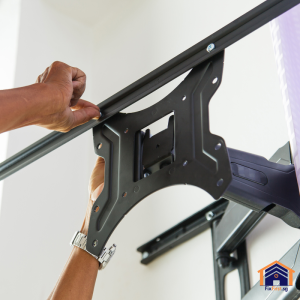
| Step 1: Choose the Right Mount | Most frames come with a proprietary mounting system. Identify whether it is a simple hook, a keyhole slot, or a VESA mount (a standard pattern for mounting screens). For heavier frames, ensure the included hardware is substantial enough; if not, purchase heavier-duty picture frame wall mounting brackets. |
| Step 2: Locate Studs or Use Appropriate Anchors | For concrete HDB walls, use a stud finder with deep-scan capability for concrete or simply use quality concrete anchors. The weight of the frame dictates the size and number of anchors needed. Always refer to the HDB drilling guidelines to avoid hitting rebar or drilling into prohibited structural elements. Also, do your drilling between 9am and 6pm. |
| Step 3: Plan the Cable Route | Before drilling any holes for the mount, plan how the power cable will travel from the frame to the outlet. The cleanest method is to drill a small hole directly behind the frame to feed the cable through the wall and down to a nearby outlet. This is often complex in HDB settings due to the concrete structure. The simpler alternative is to use a paintable cable raceway that channels the cable neatly down the wall to the socket. |
| Step 4: Mark and Drill | Hold the mounting template (or the mount itself) against the wall. Use a spirit level to ensure it is perfectly horizontal. Mark the drilling points. Drill the pilot holes, insert the wall plugs, and screw the mounting bracket firmly into place. |
| Step 5: Connect and Conceal | Hang the frame on the bracket. Connect the power cable and carefully route it along your planned path, using adhesive cable clips or a raceway to secure it neatly against the wall. Only plug it into the outlet once everything is secure. |
Want to install a digital picture frame safely without damaging your HDB walls? FixFirst’s certified handymen use professional tools and HDB-compliant techniques to mount any frame securely
Why Choose a FixFirst Handyman To Install Your Wall-Mounted Digital Frame
Installing a digital frame involves unique challenges that blend IT setup with handyman skills. Professional installation by a service like FixFirst ensures a flawless, safe, and elegant result.
✔️ Expert Cable Management: Our technicians excel at creating discreet power solutions. We can install cable raceways with a finish that blends into your wall or advise on the feasibility of in-wall wiring, ensuring a clean, professional appearance.
✔️ Secure Mounting on All Wall Types: We possess the tools and expertise to securely mount your frame on any HDB wall surface, be it concrete, drywall, or tile, using anchors and brackets rated for the precise weight and size of your device.
✔️ Technical Setup Assistance: We can assist with the initial technical setup, connecting the frame to your Wi-Fi network and ensuring it is fully operational before we leave.
✔️ Compliance and Safety: We strictly adhere to HDB drilling guidelines, protecting your home’s integrity. Our work is performed with a focus on electrical safety, properly managing all connections to prevent hazards.
✔️ Time and Stress Savings: We handle the entire process—from planning the cable route to the final mount and setup—saving you the hassle and ensuring a perfect result on the first attempt.

Frequently Asked Questions (FAQs) about Wall Mounted Digital Photo Frames in Singapore Homes
Yes, but it requires specific hollow-wall anchors like toggle bolts or snap toggles that expand behind the wall for a secure grip. The weight of the frame will determine the size and number of anchors needed.
The most effective methods are using a paintable plastic cable raceway/channel or, for a more permanent solution, hiring an electrician to install a new power outlet directly behind the frame’s location.
While the display itself is wireless, it still requires power. Truly wireless frames with long-lasting batteries are typically smaller and designed for tabletop use. A wall mount digital picture frame usually requires a primary power connection.
Most modern digital frames are designed for continuous operation and have sleep modes or scheduling features to turn the display off at night. This can prolong the screen’s lifespan and save energy.
The center of the screen should be at approximately eye level for an average-height person, typically around 145-150cm from the floor. Adjust slightly lower for frames meant to be viewed primarily from a seated position.
Only if the frame has a standard VESA mount pattern on its back. Many decorative digital frames use custom mounting solutions, so always check the manufacturer’s specifications before purchasing a separate mount.
Most modern frames support Wi-Fi and companion mobile apps. You simply upload photos to a dedicated cloud album or send them directly through the app. Some frames also support SD cards or USB drives.
A wall mounted digital photo frame is more than a gadget; it is a living heart of the modern home, pulsating with memories and stories. It represents a perfect fusion of technology and sentiment, ideal for the contemporary Singaporean lifestyle. While the prospect of mounting and powering it may seem daunting, the result—a constantly evolving personal gallery—is immeasurably rewarding. For an installation that is secure, sleek, and completely hassle-free, entrust your wall-mounting project to FixFirst. Contact us today to schedule your consultation and transform your wall into a dynamic window to your cherished memories.