LED strip lights have become a popular lighting solution in Singapore due to their versatility, energy efficiency, and modern aesthetic appeal. Whether for residential, commercial, or decorative purposes, these flexible lighting options offer endless possibilities. This guide covers everything you need to know about LED strip lights, including installation, safety, and common questions like “can you put a dimmer on LED lights?” and “are LED strip lights dimmable?”
Understanding LED Strip Lights
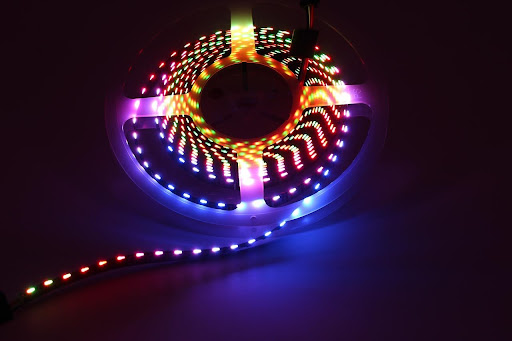
LED strip lights consist of small light-emitting diodes (LEDs) mounted on a flexible circuit board. They come in various colors, brightness levels, and lengths, making them ideal for under-cabinet lighting, accent lighting, cove lighting, and even outdoor applications. Many homeowners in Singapore use them to enhance their living spaces, while businesses employ them for signage and display lighting.
One of the key advantages of LED strips is their energy efficiency—they consume significantly less power than traditional incandescent bulbs while lasting much longer. Additionally, advanced options include RGB (color-changing) and tunable white strips, allowing for dynamic lighting effects.
Installation of LED Strip Lights in Singapore
Proper Installation of LED Strip Lights
Proper installation ensures optimal performance and longevity of LED strip lights. Here’s a step-by-step overview:
Planning Your Layout
Before installation, measure the area where you intend to place the strips. Most LED strips can be cut at designated points (marked by scissor icons) to fit specific lengths. Planning helps avoid unnecessary cuts and ensures even lighting distribution.
Preparing the Surface
Clean the surface thoroughly to remove dust and grease, as this ensures better adhesion. Most LED strips come with adhesive backing, but for extra security, especially in humid Singapore conditions, you may use additional mounting clips or aluminum channels for heat dissipation.
Wiring LED Strip Lights to a Switch
Connecting LED strips to a switch involves a few key steps. First, ensure the power is turned off. Then, connect the LED strip’s positive and negative wires to a compatible LED driver or power supply. Finally, wire the driver to a wall switch. If you’re unsure about electrical work, hiring a professional electrician in Singapore is recommended to avoid safety hazards.
Powering and Testing
Once connected, turn the power back on and test the lights. If using a dimmer, ensure compatibility—some LED strips require PWM (Pulse Width Modulation) dimmers for smooth operation.
Common Uses of LED Strip Lights in Singapore
✔️ Home Lighting: Under-cabinet kitchen lighting, bedroom accent lights, and staircase illumination.
✔️ Commercial Spaces: Retail displays, bar counters, and office ambient lighting.
✔️ Outdoor & Decorative: Garden pathways, balcony railings, and festive decorations.
Conclusion
LED strip lights offer a modern, efficient, and customizable lighting solution for homes and businesses in Singapore. Whether you’re wondering “Are LED strip lights dimmable?” or need help with wiring, proper installation ensures safety and performance. For professional assistance, consider reaching out to experts like FixFirst to ensure flawless setup and longevity of your LED lighting system.

FAQs about LED Strip Lights
Yes, you can dim LED lights, but compatibility depends on the LED bulb and dimmer switch. Not all LEDs are dimmable, so check the packaging or specifications. Dimmable LEDs require compatible dimmers, such as trailing-edge (electronic) dimmers, rather than traditional leading-edge (triac) dimmers used for incandescent bulbs. Mismatched components can cause flickering, reduced lifespan, or failure. For optimal performance, pair LEDs with dimmers listed as compatible by the manufacturer. Some smart LEDs also offer dimming via apps or voice control without requiring a physical dimmer switch. Always verify compatibility before installation.
Yes, but not all LED strips are dimmable. You must check the product specifications and use a compatible dimmer switch designed for LED lighting. PWM dimmers are often the best choice for smooth dimming.
No, only LED strips labeled as “dimmable” can be used with dimmer switches. Always verify before purchase.
Most LED strips with adhesive backing can be peeled off, but residue may remain. Using a heat gun or adhesive remover can help clean the surface.
Yes, if removed carefully, they can be reinstalled elsewhere. However, the adhesive may weaken over time, so additional mounting tape might be needed.
When installed correctly, LED strips are safe. Overheating can be a concern, so avoid covering them with insulation and ensure proper ventilation.
LED strip lights are generally safe for eyes if used properly, but prolonged exposure to high-intensity blue light (common in cool-white LEDs) may contribute to eye strain or discomfort, particularly in low-light conditions. Choosing warmer tones (3000K or lower), reducing brightness, or using diffusers can minimize risks. Some studies suggest excessive blue light before sleep may disrupt melatonin production, affecting sleep quality. Opt for high-quality, flicker-free LED strips with proper certifications (like IEC/EN 62471) for eye safety.
Connect the LED strip to a compatible power supply, then wire the supply to a switch. If unsure, consult a licensed electrician in Singapore for safe installation. For quick response, Whatsapp us here at FixFirst.
Yes, you can leave LED strip lights on all night as they generate little heat and are energy-efficient, but doing so regularly may shorten their lifespan (typically 30,000–50,000 hours). Ensure proper ventilation to prevent overheating, especially in enclosed spaces. Some LED strips may have a slight standby power draw when left on. For safety, use high-quality strips with built-in surge protection and avoid overloading the power supply. If used as a nightlight, opt for warmer colors (below 3000K) to minimize sleep disruption from blue light.
Yes, a power bank can power an LED strip light if the voltage and current requirements match. Most USB-powered LED strips (5V) work well with standard power banks, while 12V strips require a compatible boost converter or a power bank with DC output. Check the strip’s wattage (e.g., 5V/2A = 10W max) to ensure the power bank’s output can sustain it; a 10,000mAh bank may run a 10W strip for ~5 hours. Avoid overloading low-quality power banks, as sustained high current can damage them. For larger setups, a high-capacity PD (Power Delivery) power bank or direct wiring is recommended.
Yes, most LED strip lights can be cut at marked cutting points (usually indicated by scissor symbols or copper pads) to customize length. Cutting outside these points can damage the circuit. Standard 12V/24V strips are often cut every 3 LEDs, while 5V strips may require cutting per LED due to lower voltage. Always use sharp scissors for a clean cut, and ensure proper reconnection (soldering or connectors) if extending the strip. Some waterproof or high-density strips have stricter cutting rules, so check manufacturer guidelines. Improper cutting voids warranties and risks electrical failure.
Yes, you can leave LED strip lights on all night as they are energy-efficient and produce minimal heat, but long-term continuous use may slightly reduce their lifespan (typically rated for 30,000–50,000 hours). Ensure proper ventilation and avoid covering them to prevent overheating. For safety, use high-quality strips with surge protection and avoid overloading the power supply. If used as a nightlight, opt for warmer color temperatures (below 3000K) to minimize sleep disruption from blue light. Low-voltage (12V/24V) or smart strips with timers are ideal for extended use.
High-quality LED strip lights typically last 30,000 to 50,000 hours, depending on usage, heat dissipation, and component quality—equivalent to 3–17 years at 8–12 hours daily. Lifespan is measured until brightness drops to 70% (L70 standard). Factors like excessive heat, poor power supply, or high current (overdriving) can shorten longevity. Premium brands (e.g., Philips, Sylvania) often exceed 50,000 hours, while cheap, uncertified strips may fail earlier. Proper installation (aluminum channels for cooling) and avoiding 24/7 operation maximize durability. RGB strips may wear faster due to complex circuitry. Always check manufacturer ratings for accurate estimates.
To connect multiple LED strip lights, use solderless connectors (for ease) or soldering (for reliability), ensuring polarity (+/-) alignment. For longer runs, wire strips in parallel (not series) to prevent voltage drop—max length depends on strip voltage (e.g., 5V: ≤2m, 12V: ≤5m, 24V: ≤10m). Use a higher-rated power supply (e.g., 20% extra wattage) and amplifiers for RGB setups exceeding 5m. Avoid daisy-chaining beyond the strip’s current capacity (check datasheet). For smart strips, controllers like WLED or Zigbee manage multiple segments. Waterproof strips require sealed connectors. Always test connections before final installation.
LED strip lights can be controlled via wired or wireless methods, depending on the type. Basic single-color strips use a dimmer switch (TRIAC for AC, PWM for DC) to adjust brightness. RGB/RGBW strips require an RGB controller (IR, RF, or Bluetooth/Wi-Fi) for color changes, often paired with a remote or smartphone app (e.g., Smart Life, Tuya). Smart strips (Wi-Fi/Zigbee) integrate with voice assistants (Alexa, Google Home) or automation platforms (Home Assistant). For advanced setups, DMX or SPI controllers enable pixel-level control (e.g., WS2812B strips). Always match the controller’s voltage (12V/24V) and current rating to the strip’s specs. DIY options include Arduino or ESP8266 for custom programming.
To cover LED strip lights for diffusion and protection, use aluminum channels with polycarbonate or acrylic diffuser covers, which evenly scatter light and reduce glare. For DIY solutions, frosted PVC tubing or adhesive-backed diffuser strips work for basic softening. In cabinets or coves, recessed mounting behind lips or molding hides strips while reflecting light indirectly. Waterproof strips in wet areas (e.g., kitchens) should use silicone sleeves or IP-rated channels. Avoid opaque covers that block too much light; opt for milky-white diffusers (haze levels: 70–90% for balance). Secure covers with channel clips or VHB tape—never obstruct ventilation for high-power strips to prevent overheating.
To design LED strip lighting, first define the purpose (ambient, task, or accent lighting) and measure the area to determine strip length and placement. Choose strip type (single-color, RGB, or tunable white) and voltage (12V/24V for longer runs). Calculate power requirements (watts/meter) and select a compatible power supply (add 20% buffer). Use aluminum channels for heat dissipation and diffusers for even light distribution. Plan control methods (dimmer, smart app, or voice control) and wiring routes, avoiding voltage drop by powering strips from multiple points if exceeding 5m (12V) or 10m (24V). Test before final installation and adhere to safety standards (IP ratings for wet areas).
To dim 12V LED strip lights, use a PWM (Pulse Width Modulation) dimmer for flicker-free control, ensuring compatibility with the strip’s wattage (e.g., a 60W dimmer for a 50W strip). For analog strips, a simple 12V DC dimmer works, while digital (RGB/W) strips require a dedicated RGB controller. Smart dimming integrates Wi-Fi/Zigbee controllers (e.g., Lutron, Shelly) for app/voice control. Avoid cheap TRIAC dimmers (designed for AC) as they damage 12V DC strips. For multi-zone setups, use modular dimmers or DMX decoders. Always confirm the power supply supports dimming (non-constant voltage models may malfunction). For DIY, MOSFET-based circuits or Arduino PWM offer precision.
To hang LED strip lights on a wall, clean the surface with alcohol to ensure adhesion, then use the strip’s 3M adhesive backing for a temporary hold—pressing firmly along its length. For a permanent solution, secure them with mounting clips (every 20–30cm) or aluminum channels (attached with screws or heavy-duty VHB tape). Avoid sharp bends; use 90-degree connectors for corners. For uneven surfaces, flexible track systems prevent peeling. Power the strip near the starting point to minimize voltage drop, and hide wires with cable raceways. For renters, removable hooks or magnetic strips (for metal surfaces) offer damage-free installation. Test adhesion on a small area first.
To hardwire LED strip lights, first turn off the power and verify voltage compatibility (12V/24V). Connect the strip’s input wires to a LED driver/power supply (matched to the strip’s wattage + 20% buffer) using solder, crimp connectors, or terminal blocks—ensuring correct polarity (+/-). For AC mains wiring (120V/240V), use a Class 2 power supply and follow local electrical codes (e.g., NEC Class 2 wiring). Secure connections with heat shrink tubing or liquid electrical tape. Install an inline fuse (for 12V/24V) and a wall dimmer/switch if needed. Route wires through conduit in exposed areas, and test before final mounting. For permanent setups, soldering ensures reliability over clip-on connectors. Always ground the power supply if metal channels are used.
To secure LED strip lights for long-term use, clean the surface with isopropyl alcohol to maximize adhesion, then press the strip’s 3M VHB tape firmly for 30 seconds. For added durability, use aluminum mounting channels (secured with screws or heavy-duty adhesive) to prevent sagging and improve heat dissipation. Plastic clips or zip ties (every 20–30cm) work for irregular surfaces. In high-traffic areas, silicone glue or LED track systems provide extra hold. Avoid stretching the strip, and use corner brackets for clean turns. For waterproof strips, sealed connectors prevent moisture damage. Always test adhesion before finalizing placement.
LED strip lights may flash when turned off due to residual current from incompatible switches (e.g., electronic/illuminated switches leaking tiny voltage) or inductive interference from nearby wiring. Other causes include poor-quality power supplies (failing capacitors), incorrect dimmer compatibility (TRIAC dimmers on low-voltage DC strips), or phantom voltage in smart/remote-controlled setups. Fixes: install a bypass capacitor (0.1–1µF) across the strip’s terminals, use a mechanical switch, replace the power supply, or opt for a neutral wire-enabled smart switch. RGB strips may flicker if the controller lacks a proper shutdown circuit—upgrade to a relay-cutoff controller. Always check for grounding issues or faulty wiring.